Azure Hybrid
You'll deploy a Databricks workspace and catalog on Azure using Terraform in ~20 min.
Prereqs: Azure subscription, Terraform CLI
The big picture
In this section, you will find materials to help you deploy a Hybrid workspace on Azure. A hybrid workspace can use serverless compute, which Databricks manages for you, and it also lets you run compute resources (classic clusters) inside your own network: a VNet in your Azure subscription. This gives your team more control over networking and security, and covers workloads that serverless doesn't support yet. You can set up Unity Catalog resources alongside the workspace, so your data is ready to govern from day one.
This page covers three ways to deploy a hybrid workspace:
- Manual Deployment: click through the cloud and Databricks account consoles by following the YouTube tutorial.
- Automated Deployment
- Platform Deployment Kit: a guided web UI that exports ready-to-run Terraform.
- AI Platform Kit: agent skills your AI coding agent uses to generate and apply the Terraform.
If you are new to Databricks, start with the Platform Deployment Kit. It walks you through each decision (networking, storage, Unity Catalog) in a guided UI, so you don't need to know Terraform or how to prompt a coding agent up front. The output is deterministic: the same inputs always produce the same Terraform, which you can review before you apply and rerun for development, staging, and production so every workspace matches. Use the AI Platform Kit when you need customizations the UI doesn't cover, and keep manual deployment for learning how the pieces fit together.
Manual Deployment - YouTube Tutorial
The video shows the manual UI steps. Clicking through the portal is easy to miss a setting on, and the next workspace will drift from this one. Use the Automated Deployment options on this page instead so every workspace matches.
Prerequisites
- An Azure subscription with Contributor at subscription scope (not resource-group only, because Databricks creates a managed resource group).
- A Databricks account with account-admin privileges.
- Terraform CLI installed locally.
- Azure CLI authenticated (
az login).
Automated Deployment
The Platform Kit is a suite of tools designed to help you deploy your workspaces faster. It features a deterministic app, for teams who want to define their deployment through a guided UI experience, and a set of LLM skills, for teams who want to use an AI coding agent to help with the deployment.
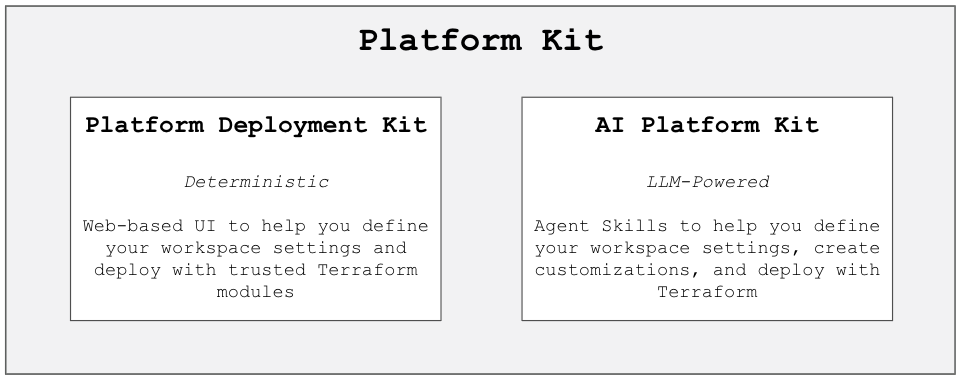
Platform Deployment Kit
The Platform Deployment Kit is a guided web UI that helps you define your environment and automatically exports the Terraform code to run your deployment. Use it when you want a deterministic, click-through path instead of prompting an agent.
AI Platform Kit
The AI Platform Kit is a set of agent skills that your AI coding agent uses to define your workspace settings, create customizations, and deploy with Terraform.
Paste this into your coding agent to provision the hybrid Azure workspace with AI Platform Kit.
Install and use the Databricks AI Platform Kit (https://github.com/databricks-solutions/ai-platform-kit) if it is not already installed.
macOS/Linux: bash <(curl -sL https://raw.githubusercontent.com/databricks-solutions/ai-platform-kit/main/install.sh)
Windows PowerShell: irm https://raw.githubusercontent.com/databricks-solutions/ai-platform-kit/main/install.ps1 | iex
Then follow the kit skills (platform-provisioning, unity-catalog-setup, identity-governance, workspace-config, deployment-verification as needed) to provision a classic Databricks workspace on Azure with VNet injection and Unity Catalog.
Requirements for this deploy:
- Cloud: Azure
- Architecture: classic workspace with VNet injection (No Public IP where appropriate)
- Include Unity Catalog (metastore assignment or creation as appropriate, plus catalog/storage pieces the skills recommend)
- Environments and naming: ask me for subscription, region, resource group names, workspace name, VNet CIDRs, and any compliance constraints before generating Terraform
Workflow:
- Confirm cloud and Databricks auth (az login with Contributor at subscription scope, Databricks CLI / account admin access). Pin DATABRICKS_AUTH_TYPE=azure-cli when needed.
- Ask me for any missing value. Do not guess regions, CIDRs, resource group names, or account IDs.
- Generate Terraform from the kit skills for my requirements. Do not clone a fixed technical-services-solutions template as the source of truth.
- Run terraform init and terraform plan. Explain the plan (resource groups, VNet/subnets/NSG/NAT, VNet-injected workspace, UC resources) before any apply.
- Run terraform apply only after I explicitly approve the plan. Never apply or destroy without approval.
- After workspace and UC are up, run the kit's mandatory three-path verification: classic cluster, serverless SQL warehouse, and serverless notebook job.
If something fails, diagnose with the kit gotchas guidance and re-plan before retrying.
Terraform resources
Open the repository for your scenario and follow its README.md. In each repo, run commands from the tf/ directory: copy terraform.tfvars.example to terraform.tfvars, set your values, then run terraform init && terraform apply.
Repeat for development, staging, and production. Use workspace_name, resource_group_name, or your naming prefix to tell environments apart (for example dev, staging, prod).
If you are new to Databricks, start with Workspace + Catalog (first row).
| Terraform template | What it creates | URL |
|---|---|---|
| 💎 Workspace + Catalog |
| azure-vnet-injection-uc |
| Workspace |
| azure-vnet-injection |
| Private Link |
| azure-privatelink-classic |
When you use an existing metastore with Workspace + Catalog, admin_user must have CREATE EXTERNAL LOCATION on that metastore.
Pin the Databricks provider to Azure CLI auth before apply: export DATABRICKS_AUTH_TYPE=azure-cli
Validate your Deployment
Log in to the Databricks account console.
Open Workspaces and confirm the new workspace shows Running.
Open the workspace, go to Catalog, and confirm the new catalog appears (for the Workspace + Catalog template).
Create a simple general purpose single node cluster and confirm it starts. This proves clusters can spin up after the deployment.
Where people trip
PERMISSION_DENIED: User is not an owner of Metastore while creating catalog
The identity running Terraform lacks metastore-level permissions. Fix it one of two ways:
- Option 1: Add the user or service principal to the metastore admins group.
- Option 2: Grant catalog creation on the metastore:
GRANT CREATE CATALOG ON METASTORE TO `principal_name`;
Terraform apply fails with permission errors
Confirm az login (or your service principal) has Contributor access on the target subscription. Run az account show to check the active subscription.
VNet injection fails with subnet errors
Subnets must be delegated to Microsoft.Databricks/workspaces and must not overlap existing address spaces. Make sure subnet_public_cidr and subnet_private_cidr fit inside the VNet cidr. vnet_resource_group_name must differ from resource_group_name.
Regulated Deployments and Security Reference Architecture
For regulated environments, deploy a hardened workspace with Private Link and the Security Reference Architecture (SRA) defaults, so traffic stays off the public internet. Use the SRA Terraform templates:
| Resource | Link |
|---|---|
| SRA documentation site | databricks.github.io/terraform-databricks-sra |
| GitHub repo (Azure) | databricks/terraform-databricks-sra/azure |
Next
- Do next: Add Users
- Learn why: Unity Catalog foundations
- Reference: Databricks Terraform provider