Add Users: Manual
You'll add users to the Databricks account through the console in ~2 min per user.
Prereqs: Account Console, account-admin privileges
The big picture
Users registered at the account level, ready to assign to any workspace.
Prerequisites
- Account-admin access to the Databricks account console.
Steps
Register users at the account level through the console. You assign them to workspaces and groups later.
In the left panel, click User management. On the Users tab, click Add user, enter the user's email and full name, then click Add. The user now shows up in the Users list.
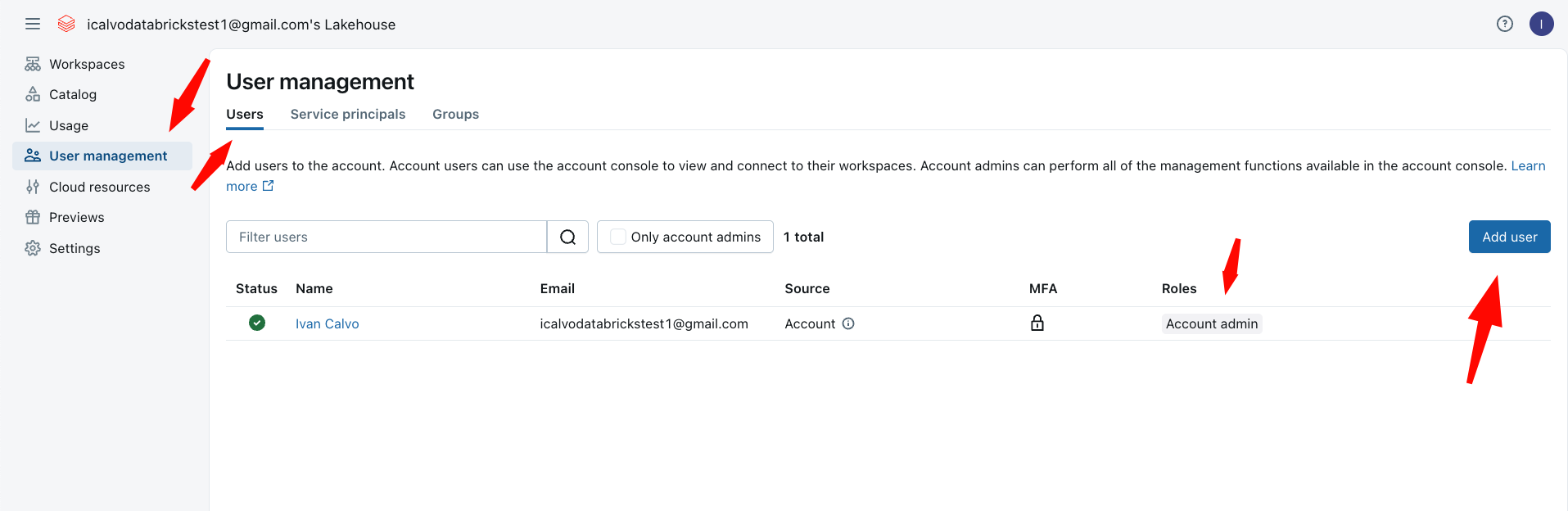
Add everyone who needs access. You assign them to workspaces and groups in the next steps, so for now you are just getting the names into the account.
Reference: Add users to your account (Databricks docs)
Verify
Where people trip
User already exists error
The email is already in the account. Search the Users tab for it: a previous admin may have added that person by hand, or a SCIM sync already pulled them in.
Next
- Do next: Add Users: SCIM
- Learn why: Account Console foundations
- Reference: Add users to your account