6. Data science
You'll understand how Databricks connects feature engineering, model training, deployment, and inference into a governed production lifecycle.
Prereqs: Build the first ETL pipeline, Unity Catalog foundations, Operations and CI/CD
The big picture
A Databricks MLOps solution is three Ops disciplines working in concert:
| Layer | What it governs | Databricks tool |
|---|---|---|
| DataOps | Feature tables, training sets, inference outputs | Unity Catalog |
| ModelOps | Experiment tracking, model registry, model serving | MLflow |
| DevOps | Repo structure, CI/CD pipelines, environment promotion | DABs + Git (see Operations and CI/CD) |
Starter Journey Progress
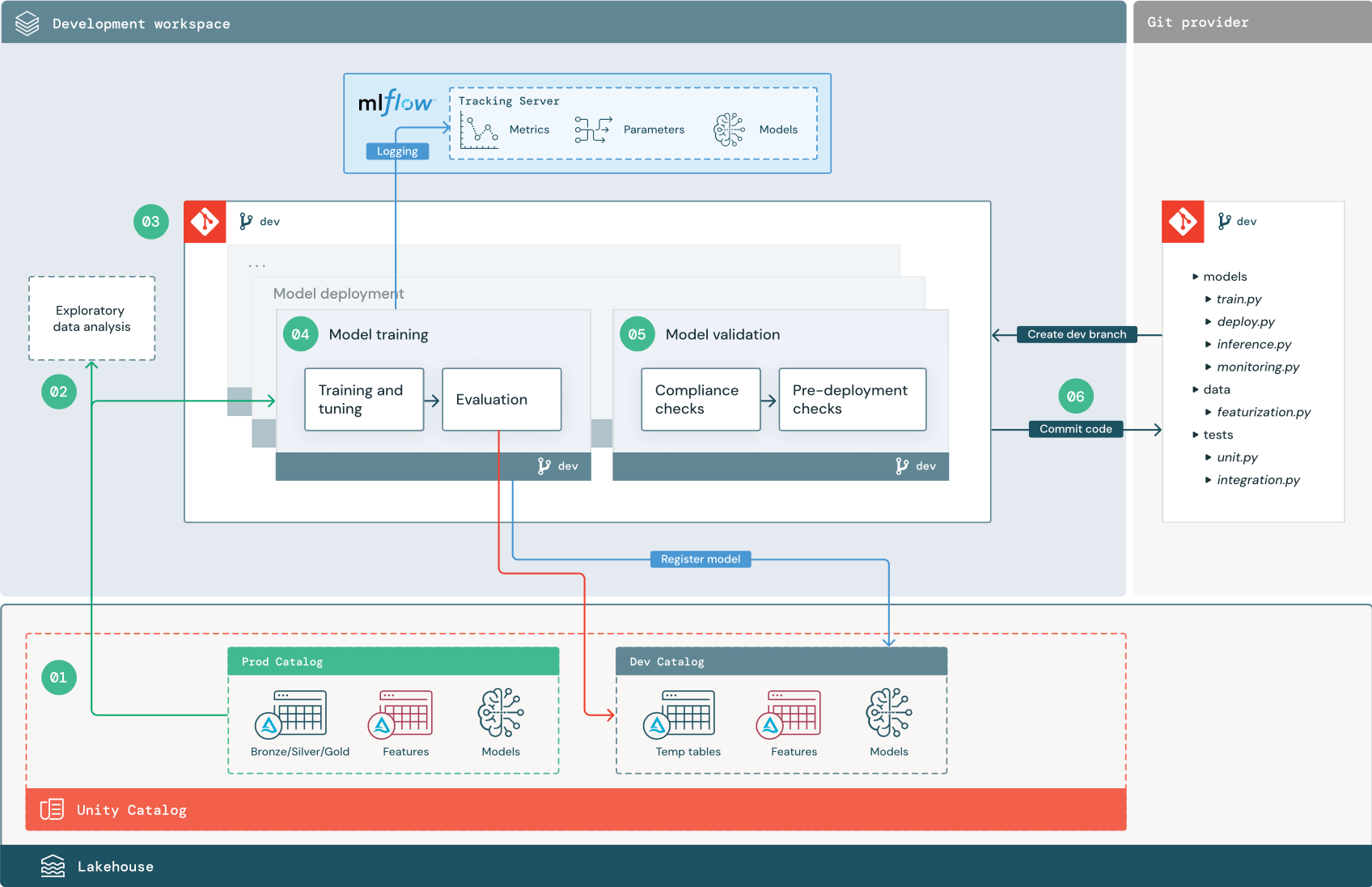
The diagram below shows the three Ops layers in action. DataOps (Unity Catalog) provides the governed data assets in Prod and Dev catalogs. ModelOps (MLflow) tracks experiments and moves models from Challenger to Champion. DevOps wires it all together through Git. At the end of the day, everything here is code sitting in a repo.
Watch first
This video is the definitive guide for MLOps on Databricks. It puts into practice the concepts from the Data Governance, Build the first pipeline, and CI/CD sections. Watch it before you read the subpages.
Deploy the MLOps quickstart
The mlops-quickstart repo trains, registers, and promotes a model end to end. Before you deploy it, get familiar with Operations and CI/CD. The quickstart uses DABs and GitHub Actions, so understanding those first makes the deployment straightforward.
Once you have the project running, read the Adapt this template with Genie Code section in the repo to swap in your own data, model, and inference pipelines using the built-in Databricks Assistant skills.
Essential reads
| Resource | What it covers |
|---|---|
| Manage model lifecycle in Unity Catalog | End-to-end reference for the full MLOps lifecycle on Databricks |
| Get started with MLflow 3 for models | Setup guide and example notebook for MLflow 3 |
| MLflow 3 ML workflow | Classic ML training and tracking with MLflow 3 |
| MLflow 3 DL workflow | Deep learning training and tracking with MLflow 3 |
In this section
- Save a Model to Unity Catalog: train and register a model in UC, and register existing models from a Volume or Hugging Face.
- Batch Inference: score data with the challenger model in pandas and Spark batch jobs, and run large-scale tracked inference.
- Datasets as Feature Tables: install the Feature Store and Online Inference demo to explore feature engineering, online tables, and Lakeflow Declarative Pipelines.
Next
- Do next: Save a Model to Unity Catalog
- Learn why: Operations and CI/CD
- Reference: MLflow on Databricks