Set Admin Group
You'll transfer metastore ownership to a dedicated admin group in ~5 min.
Prereqs: Add Groups, a metastore admin group created (e.g.,
metastore-admins)
What you'll build
A metastore owned by a group instead of an individual user or service principal. This ensures shared responsibility and prevents a single point of failure.
Prerequisites
- Account-admin access to the Databricks account console.
- A metastore admin group already created (see Add Groups).
The metastore admin must be a group. Avoid assigning individuals or service principals as the metastore owner — if the individual leaves or the principal is deleted, governance operations stop.
Steps
1. Open the account console
Go to the account console for your cloud provider:
2. Navigate to the metastore
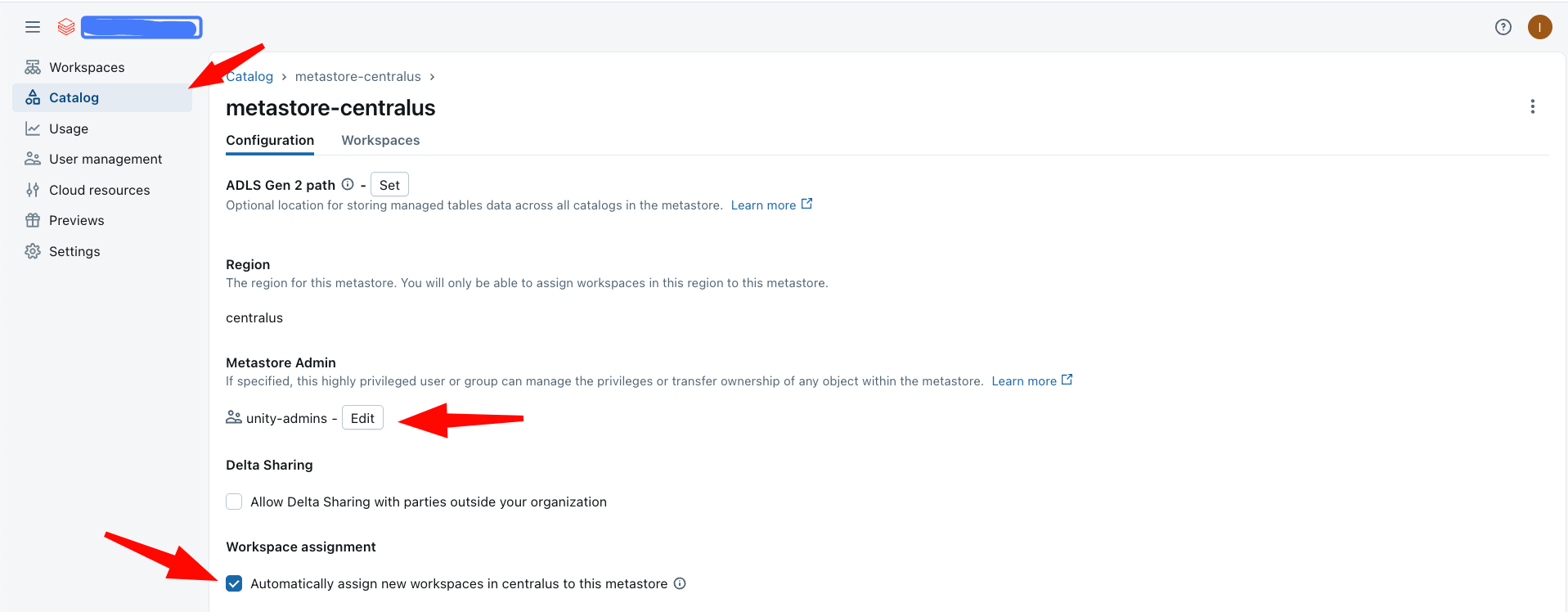
- On the left panel, click Catalog.
- Click on the available metastore.
3. Verify the current owner
Check who currently owns the metastore. If it is already a group (e.g., metastore-admins), no change is needed.
4. Transfer ownership
If the owner is a user or service principal:
- Click the owner field to edit it.
- Assign the metastore admin group (e.g.,
metastore-adminsorunity-admins) as the new owner.
5. Configure metastore settings
- Enable auto-assignment for new workspaces if you want the metastore attached automatically.
- (Optional) Activate Delta Sharing if required for your projects.
Verify
- In the account console, navigate to Catalog and click the metastore.
- Confirm the Owner field shows the admin group name, not an individual user.
Troubleshoot
Cannot change the metastore owner
Only the current metastore owner or an account admin can transfer ownership. Verify you have account-admin privileges. If the current owner is a user who has left the organization, contact Databricks support.
Next
- Do next: UC assets ownership
- Learn why: Unity Catalog foundations
- Reference: Manage metastore privileges