Add Groups
- Follow the industry standard.
- Add and manage groups for access control and permissions.
Journey checklist
-
Identify target cloud tenant(s). - Infra setup.
- Create workspaces.
- Add users.
- Add groups.
- Change ownership to metastore admins.
- Activate SSO.
- Data Governance Strategy.
- Access your data.
- Build the first pipeline.
- Automation and orchestration.
- Query and explore.
- Databricks AI/BI
Industry standard
The groups below represent the different types of people who will be using your data. Think of these as "job roles" within your project.
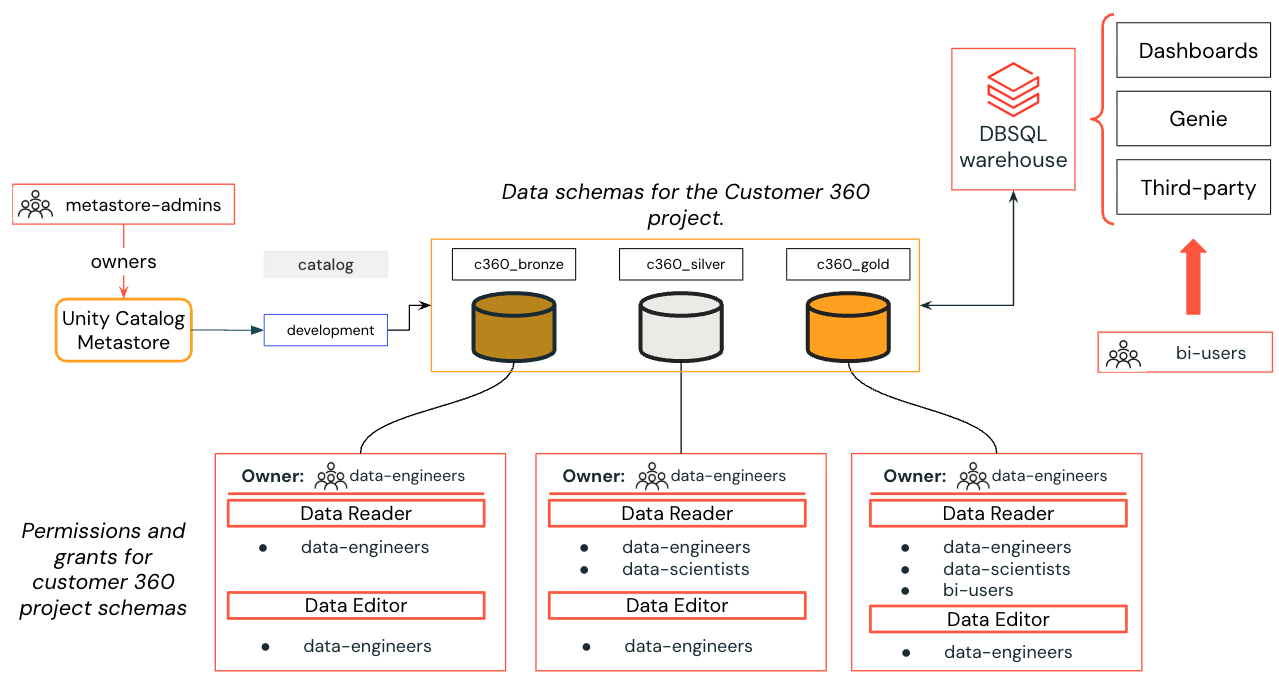
Example: Customer 360 project for the marketing business unit.
Metastore Admins (often named as Unity Admins)
These are the "Super Users" of your data world. They have the master keys to the entire system and are responsible for the big-picture setup.
-
What they do: They oversee the Metastore (the giant digital catalog that lists every table and file you own). They decide who is allowed into the building and who gets a key to which room.
-
What they can do: They have "Full Control." This means they can create new data catalogs, delete old ones, and change the security settings for the entire organization.
-
The Goal: To keep your data organized and secure, making sure the right people have access to the right info—and that nobody else does.
Data Engineer
These are the people who build and maintain the "plumbing" for your data. Without them, there would be no information for anyone else to use!
-
What they do: They create the pipelines that move data from its raw source into organized tables. They make sure the data is clean, reliable, and ready for the rest of the company.
-
What they can do: They usually have "Read and Write" access. This means they can create new tables, update existing ones, and manage how the data is stored.
-
The Goal: To ensure the data "pipes" never leak and that the information is always fresh and accurate.
-
Tool stack: Python, Spark, SQL, Dashboards, CI/CD and DevOps.
Data Scientist
These are the folks who turn raw data into smart predictions. They use existing information to build Machine Learning models and Generative AI (GenAI) tools.
- What they can see: They have "Read-Only" access. Think of this like a library—they can read the books (tables) and take notes, but they aren't allowed to scribble in the margins or delete the pages.
- What they do: They study specific sets of data to create solutions that "predict" the future or generate new content.
- Tool stack: Python, Pandas, MLflow, ML and GenAI frameworks.
Data Analyst
These are the people who turn numbers into answers. They look at what happened in the past to help the company make better decisions today.
-
What they do: They use "read-only" data to create dashboards, charts, and reports (like Tableau or Power BI). They answer questions like, "How many shoes did we sell last month?" or "Which region is growing the fastest?"
-
What they can see: Like the Data Scientists, they have "Read-Only" access. They can look at the tables and summarize the information, but they don't change the underlying data.
-
The Goal: To provide "Business Intelligence"—basically, making sure the leadership team has the facts they need to run the company.
-
Tool stack: SQL, Dashboards and Visualizations.
Business User (often referred to as BI User or Data Consumer)
These are the people who use data to make quick, daily decisions. They don’t need to see the "messy" side of data—they just want the final answers.
-
What they do: They look at finished Dashboards, Reports, and Data Apps to see how the business is doing. They are the "end-users" of everything the other teams build.
-
What they can see: They have "View-Only" access to specific reports.
-
The "Dummy-Proof" Catch: Unlike the other groups, these users never actually enter the Databricks Workspace. Think of it like a restaurant: the Engineers and Scientists are in the kitchen (the workspace), but the Business User stays in the dining room where the finished meal (the dashboard) is served to them.
-
The Goal: To get clear, visual answers to business questions without ever touching a line of code or a complex database.
-
Tool stack: Excel.
Workspace Admins
For each workspace, create an admin group, for instance:
Dev Workspace Admins|dev-ws-admins.Staging Workspace Admins|stg-ws-admins.Prod Workspace Admins|prod-ws-admins.
More granularity and isolation is required
- If more isolation levels is required, add the business unit or project name as prefix to the groups.
- This practice is common on medium-large organizations where a single
Data Engineersgroup doesn't fit the required governance granularity.
For each business unit or project, add a group with the required prefix:
[bu-project]-Data Engineers|[bu-project]-data-engineers.[bu-project]-Data Scientists|[bu-project]-data-scientists.[bu-project]-Data Analysts|[bu-project]-data-analysts.[bu-project]-BI User|[bu-project]-bi-user.