Unity Catalog
You'll understand how Unity Catalog centralizes governance for data and AI in ~5 min.
Prereqs: Workspace
Why this matters
Without a central governance layer, teams end up with fragmented access controls spread across workspaces, hardcoded credentials buried in notebooks, and zero visibility into how data flows between systems. Unity Catalog (UC) solves this by providing a single place to manage permissions, lineage, and discovery for every data and AI asset in your Databricks environment.
Mental model
UC sits between your workspaces and your data lake. Workspaces connect to a shared metastore, and every interaction with data, models, or functions is routed through UC so that permissions, lineage, and audit logs are enforced automatically.
Your data, metadata, and AI models always remain in your organization's cloud account. UC never moves data out—it only governs access to it.
How it works
The three-level namespace
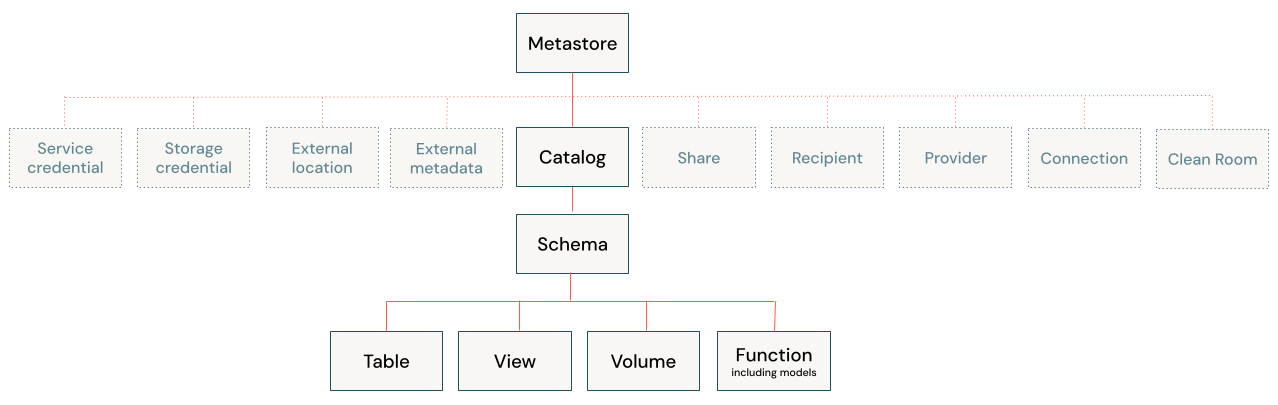
Every asset in UC is addressed as catalog.schema.object. This convention keeps names unique across the entire organization and makes it easy to separate environments (dev vs. prod) or teams.
-- catalog.schema.table
SELECT * FROM my_catalog.my_schema.my_table;

-- Example: select the gold table "sales" from the galaxy project in the dev catalog
SELECT * FROM dev.galaxy_gold.sales;

-- Set defaults to shorten queries
USE CATALOG dev;
USE SCHEMA galaxy_gold;
SELECT * FROM sales;
Governance of all interactions
Whenever a user or service principal creates, reads, updates, deletes, or runs a UC object—whether it is a table, view, volume, function, or model—UC checks the associated grants before allowing the operation.
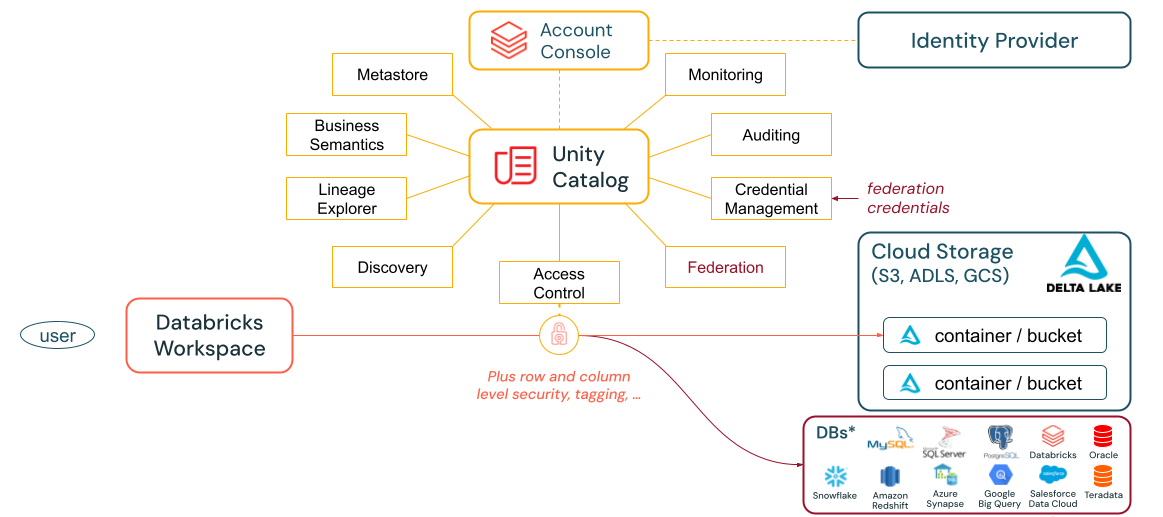
This means every data and AI interaction should flow through UC. If it does, you get fine-grained access control, full lineage, and a complete audit trail for free.
When to use / when not to
Use UC when:
- You need a single permission model across multiple workspaces.
- You want automatic lineage tracking for tables, views, and ML models.
- You need to share data or AI assets across teams without duplicating them.
- You want centralized audit logs for compliance or security reviews.
Not the right tool when:
- You are running a quick local experiment that doesn't touch shared data—but even then, defaulting to UC avoids credential sprawl.
Common pitfalls
Hardcoded credentials
Bypassing UC with connection strings or secrets embedded in notebooks defeats every governance guarantee. If a credential is hardcoded, UC can't audit or revoke access.
Cluster-level data access via environment variables
Configuring data access at the cluster level using external libraries and environment variables is another way to sidestep UC. It creates hidden dependencies that are invisible to lineage and impossible to audit.
Key terms
| Term | Definition |
|---|---|
| Unity Catalog | The centralized governance layer that manages permissions, lineage, and discovery for all data and AI assets across Databricks workspaces. |
| Metastore | The top-level container for UC metadata. Each Databricks account region has one metastore shared by all workspaces in that region. |
| Catalog | The first level of the three-level namespace. Typically maps to an environment (dev, staging, prod) or a business domain. |
| Schema | The second level of the namespace, grouping related tables, views, volumes, and functions within a catalog. |
| Grants | Permissions assigned to principals (users, groups, service principals) that control what operations they can perform on UC objects. |
Next
- Do next: Create your first workspace on AWS
- Learn why: Workspace foundations
- Reference: What is Unity Catalog? — Databricks docs