Account Console
You'll understand what the account console manages and how it relates to workspaces and Unity Catalog in ~5 min.
Prereqs: none
Why this matters
Without a central admin layer, each workspace becomes an isolated silo with its own users, permissions, and billing. The account console is the single place where you provision workspaces, manage identity, assign metastores, and track costs across your entire Databricks deployment.
Mental model
The account console is to Databricks what the AWS console, Azure portal, or GCP cloud console is to your cloud provider. It sits above individual workspaces and controls everything that spans them.
How it works
Account-level objects
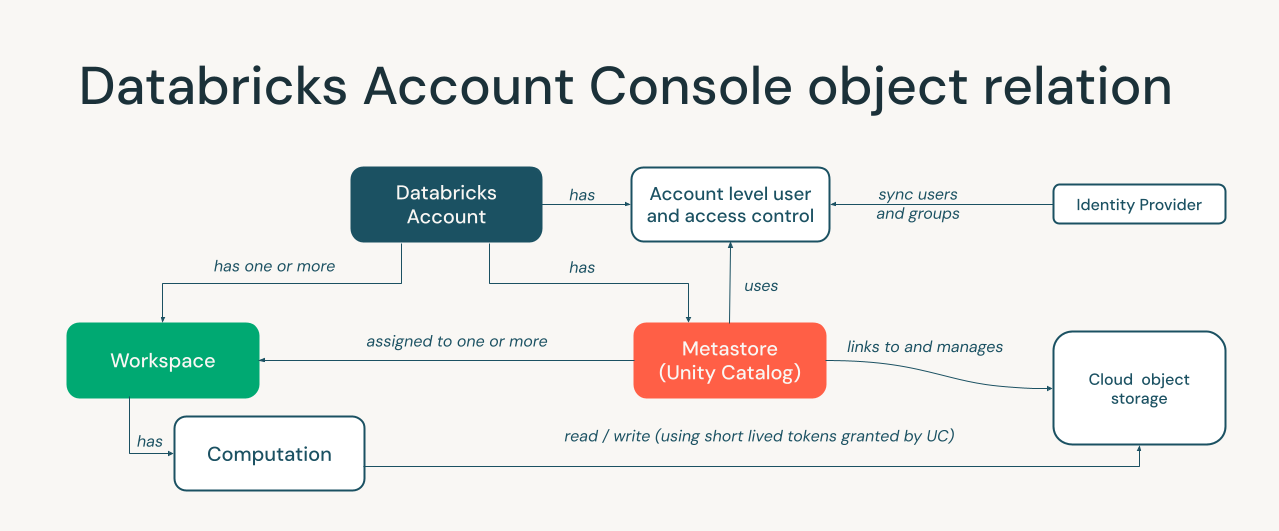
From the account console you provision and manage:
- Workspaces — deploy new environments, monitor status, assign regions.
- Unity Catalog metastores — create and attach the governance layer to workspaces.
- Users, groups, and service principals — centralized identity that syncs down to workspaces.
- Billing and budgets — track DBU consumption, set spend alerts.
- SCIM and SSO — automate user provisioning and enforce single sign-on.
How objects relate
The diagram below shows how account-level objects (metastores, workspaces, identity) connect at a deeper level.
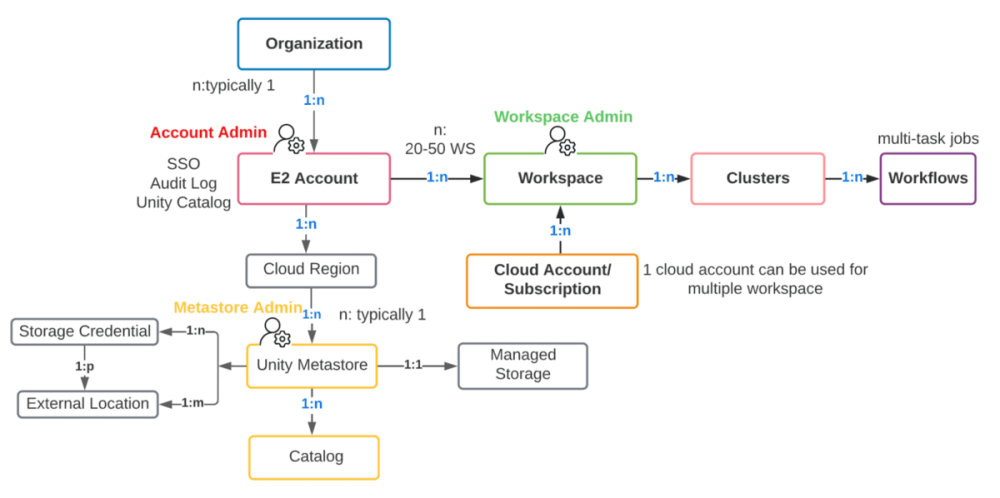
A single account can own many workspaces. Each workspace in a region is attached to one metastore. Users and groups defined at the account level are available to any workspace they are assigned to.
When to use / when not to
Use the account console when:
- You need to create or delete a workspace.
- You are setting up SSO or SCIM for automated user provisioning.
- You want to view cross-workspace billing.
- You need to create or assign a Unity Catalog metastore.
Use the workspace UI instead when:
- You are writing notebooks, running jobs, or querying data — that happens inside a workspace, not in the account console.
Common pitfalls
Confusing account admin with workspace admin
Account admins manage workspaces, identity, and billing. Workspace admins manage objects inside a single workspace. Giving someone account-admin rights when they only need workspace-level access over-privileges them.
Key terms
| Term | Definition |
|---|---|
| Account console | The Databricks admin portal that manages resources spanning multiple workspaces. |
| Account admin | A role with full control over the Databricks account — workspaces, identity, billing, and metastores. |
| Workspace admin | A role with admin control scoped to a single workspace. |
| SCIM | System for Cross-domain Identity Management — automates user and group sync from your identity provider to Databricks. |
Next
- Do next: Workspace
- Learn why: Unity Catalog
- Reference: Manage your Databricks account