Workspace
You'll understand what a Databricks workspace is, what lives inside it, and how many you need in ~5 min.
Prereqs: Account Console
Why this matters
A workspace is where all the actual work happens — notebooks, jobs, dashboards, SQL queries, ML experiments. Choosing the wrong number of workspaces or misunderstanding their boundaries leads to permission sprawl, environment contamination, or unnecessary cost.
Mental model
A workspace is a cloud-based environment tied to a single region in your cloud account. It groups compute, storage references, code, and user permissions into one boundary. Multiple workspaces share identity and governance through the account console and Unity Catalog.
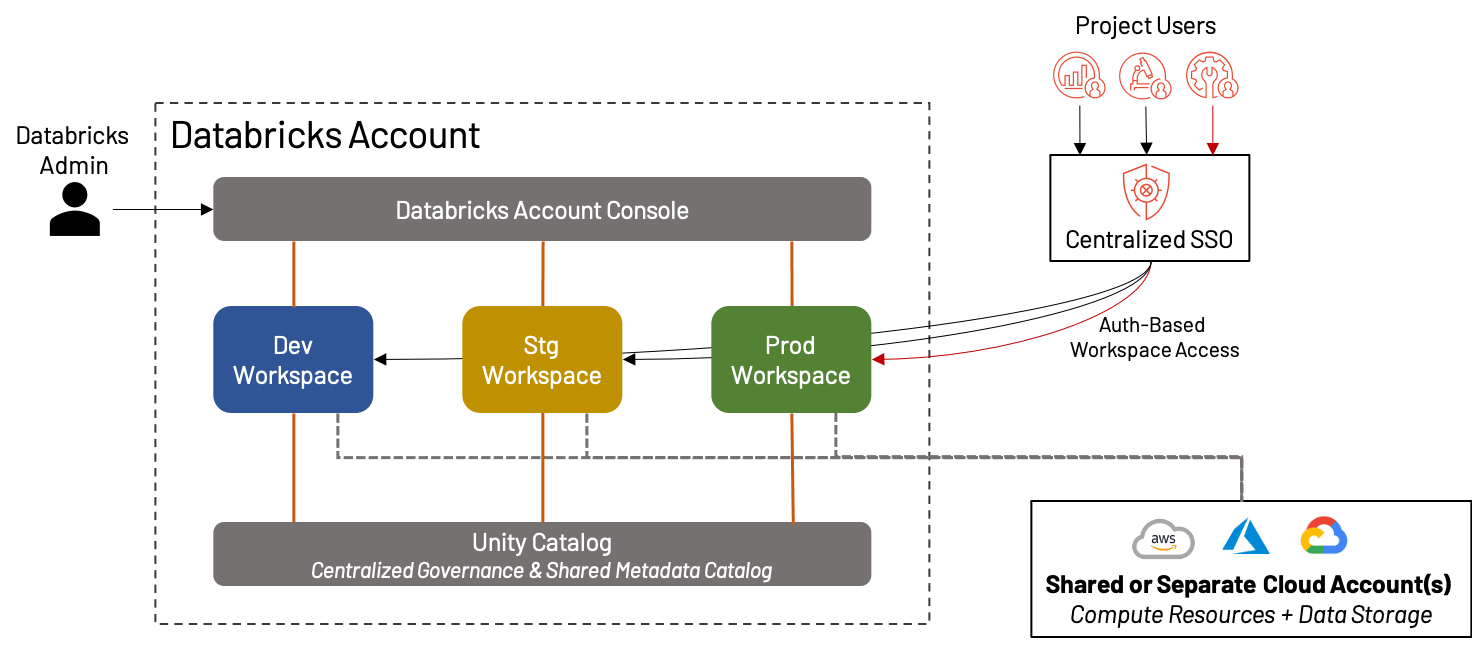
How it works
What lives inside a workspace
Each workspace contains:
- Notebooks and repos — code authoring and version control.
- Jobs — scheduled or automatic orchestration (DAGs).
- Pipelines - ingestion and transformation pipelines.
- Clusters and SQL warehouses — compute for engineering, analytics, and ML.
- Dashboards — visualizations and BI artifacts.
- ML experiments and models — tracked via MLflow.
For the full list of workspace objects and their access controls, see:
How many workspaces do you need
Start with three, aligned to the software development lifecycle:
- Development — where engineers iterate on code and test changes.
- Staging — integration testing and user acceptance before production.
- Production — stable workloads serving the business.
You do not need a separate workspace per team or business unit. Add teams to an existing workspace as groups with the appropriate permissions.
If required, every team or business unit can have a dedicated workspace and catalog.
Data isolation
Workspaces alone do not isolate data. Physical and logical data isolation is handled by Unity Catalog, covered in the next section. A workspace can access any data its attached metastore governs, subject to grants.
Common pitfalls
One workspace for everything
Running dev and production workloads in the same workspace means an untested job can impact production pipelines. The dev/staging/prod split costs little and prevents a lot of incidents.
One workspace per team
Over-splitting creates admin overhead and makes cross-team collaboration harder. Add teams as groups to shared workspaces unless there is a hard compliance reason to separate.
Key terms
| Term | Definition |
|---|---|
| Workspace | A cloud-based Databricks environment scoped to a region, containing notebooks, jobs, compute, and dashboards. |
| Workspace admin | A role with admin privileges scoped to a single workspace — manages users, clusters, and workspace settings. |
Next
- Do next: Unity Catalog
- Learn why: Account Console
- Reference: Databricks workspace overview