Create Workspaces
You'll create Databricks workspaces with dedicated VPC/VNet isolation in ~15 to 30 min per workspace.
Prereqs: Cloud Tenant ready
Why this matters
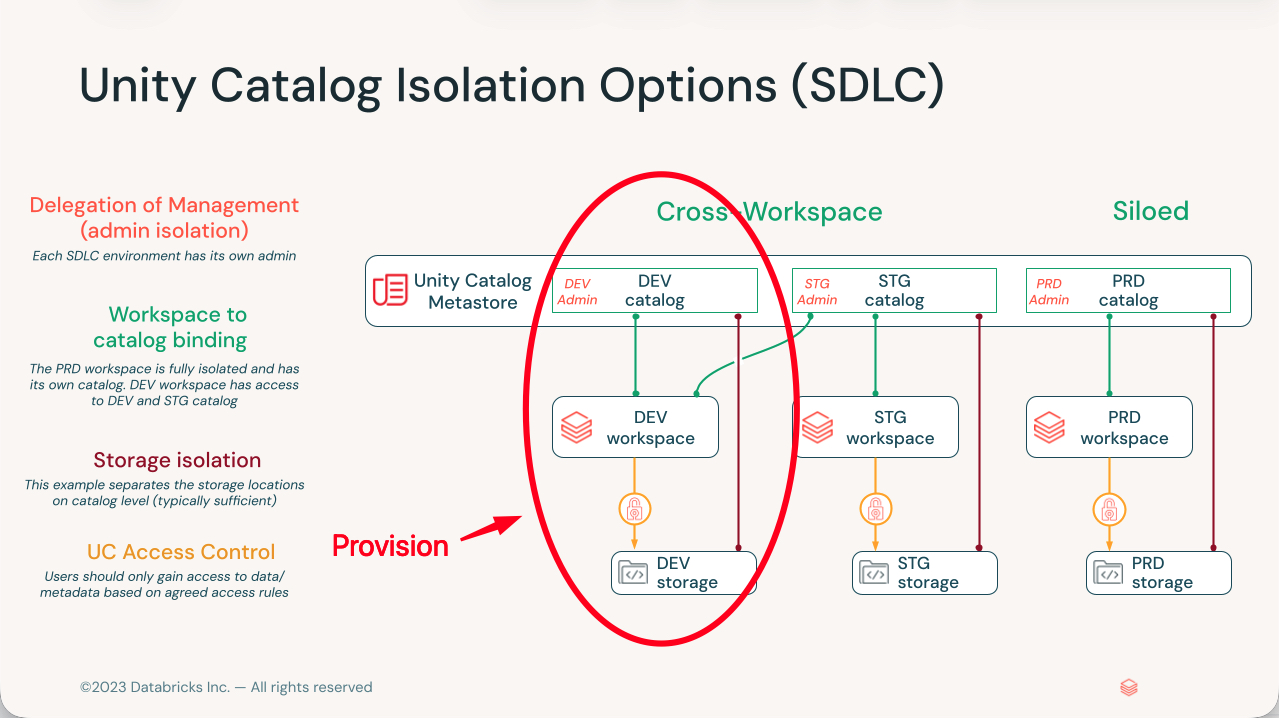
Build three workspaces, one each for development, staging, and production, and give each its own network. That is the layout most teams land on, and it is much cheaper to set up that way now than to untangle later. A workspace is the compute and collaboration boundary in Databricks, and it cannot move regions or merge with another once it exists. The choices you make in the creation wizard are the choices you live with.
Each workspace runs inside its own VPC on AWS, VNet on Azure, or VPC on GCP. That network boundary is what keeps a runaway experiment in dev from reaching production data, and it lets you apply different access rules per environment without them leaking into each other.
The three-workspace layout
Think of the three workspaces as the three rooms a change passes through before it ships:
- Development is where engineers write and test code.
- Staging is integration testing and user acceptance before anything goes live.
- Production is the stable workloads the business depends on.
Keep them isolated at the network level, not just by folder or permission. The whole point is that a mistake in one room stays in that room.
For more on isolation choices, see Data Governance Strategy for medium-large organizations. For the workspace mental model, see Workspace foundations.
Manual or Terraform
Every cloud gives you two ways to deploy:
- Manual is point-and-click through the account console or cloud portal. Use it for your first workspace or a proof of concept, when seeing the resources appear teaches you what the code will later automate.
- Terraform is infrastructure as code: repeatable and version-controlled. Use it for staging and production, where you want the same workspace every time and a record of what changed.
A common path is to click the first workspace by hand, then Terraform the rest once you know what the wizard built.
Pick your cloud provider
| Method | AWS | Azure | GCP |
|---|---|---|---|
| Manual | Console wizard | Azure portal | Console wizard |
| Terraform | BYOVPC | VNet injection | BYOVPC |
| Private Link + Terraform (SRA) | AWS SRA | Azure SRA | GCP SRA |
Next
- Learn why: Workspace foundations
- Reference: Databricks workspace administration