14. CI/CD and DevOps
You'll learn how to split DevOps responsibilities between Terraform and Declarative Automation Bundles (DABs), and how to run CI/CD for Databricks projects in ~15 min.
Prereqs: 7. Build the first pipeline: DABs, 8. Automation & orchestration: DABs, 3. Infra setup
Why this matters
Draw one line and most of the confusion goes away: anything outside the workspace is Terraform's job, anything inside it is the DABs job. Get that line wrong and you end up with brittle scripts, environments that drift apart, and a deploy only one person knows how to run.
Clicking changes into the Workspace by hand works until it doesn't. The moment a second person needs to ship, or you need staging to match prod, you want repeatable deploys, a review gate, and a way to promote a change from dev to prod. That is the same discipline that keeps application code sane, applied to data work.
Starter Journey Progress
The two layers
Databricks DevOps is two separate concerns, each with its own tool and lifecycle.
| Layer | What it covers | Tool | Example |
|---|---|---|---|
| Platform infrastructure (external, AWS and Databricks account related) | Accounts, networks, metastores, workspaces, and IAM: anything that lives outside a Databricks workspace | Terraform | Terraform Examples |
| Databricks Projects (internal, within the Workspace) | Jobs, pipelines, schemas, dashboards, and other assets a Databricks project needs. | Declarative Automation Bundles (DABs) |
What is DABs?
Declarative Automation Bundles (DABs) is infrastructure-as-code for Databricks. The simplest way to think about it: Databricks as code. Project assets live in Git as YAML and source files instead of as clicks someone made in the Workspace and hoped to remember.
- IaC for the workspace. DABs defines jobs, pipelines, schemas, and related resources in config files. The bundle is what you deploy: one repo, one project, several environment targets.
- A software-engineering workflow. A Databricks project lives the same way application code does, with branches, pull requests, and CI/CD. Your team picks the branching model. Default to trunk-based development, since it keeps main deployable and spares you long-lived branches that fight to merge.
- CLI-native. DABs ships with the Databricks CLI. Install the CLI on a CI/CD runner such as a GitHub Actions worker in one step, then run
databricks bundle deployfrom the pipeline. - CI/CD in practice. A typical pipeline validates the bundle, runs tests, and deploys to a target workspace. See Create a GitHub Actions workflow for CI/CD for a full example.
DABs in the Workspace
DABs in VSCode + Github Actions Deployment
Configure VSCode Databricks Extension V2
DABs projects for reference
| Repo | What's inside |
|---|---|
| bundle-examples / knowledge_base | Official Databricks reference library. Covers Genie Agents, Metric Views, Apps, Lakebase, Jobs, Pipelines, Models, Model Serving Endpoints, and Vector Search indexes. Good first stop for any bundle pattern. |
| databricks-dab-examples / flights | End-to-end worked example built around a flights dataset. Comes in three tiers (simple, advanced, bundle template) so you can follow the progression from a minimal bundle to a production-ready project. |
| databricks-dab-examples / knowledge-base | Solutions-team reference examples. Includes an Azure DevOps CI/CD pipeline, a React + Lakebase app, metric views, a uv-managed bundle, and a DAIS 2024 modular orchestration template. |
DABs deployments from CI/CD
Github Actions Workflows deployment
- Right click the image and click "Open Image in New Tab"
The catalog and schema DABs values come from GitHub repository environments, not from inside the bundle itself.
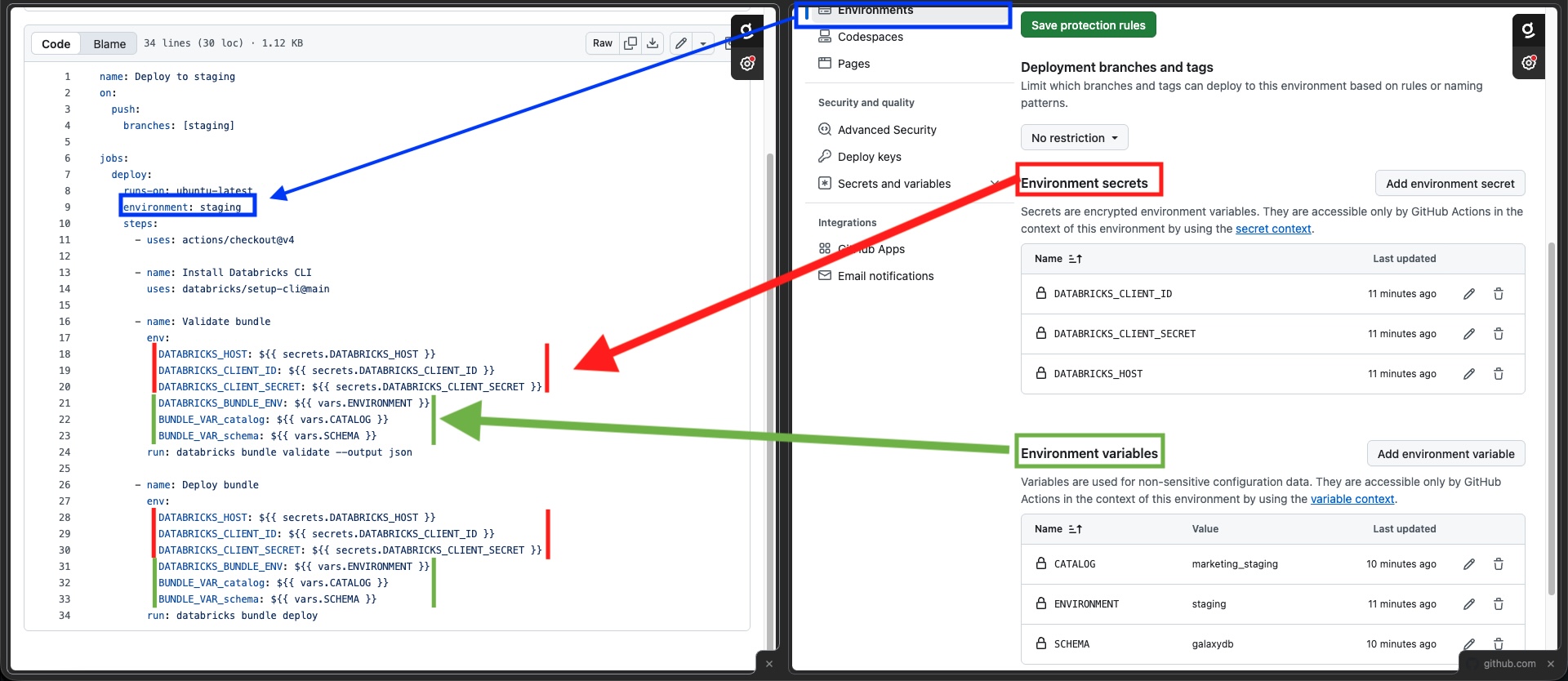
Code from the screenshot
This is the output you get from the next section. It works the same way with Azure DevOps, GitLab CI, and other CI/CD tools.
name: Deploy to staging
on:
  push:
    branches: [staging]

jobs:
  deploy:
    runs-on: ubuntu-latest
    environment: staging
    steps:
      - uses: actions/checkout@v4

      - name: Install Databricks CLI
        uses: databricks/setup-cli@main

      - name: Validate bundle
        env:
          DATABRICKS_HOST: ${{ secrets.DATABRICKS_HOST }}
          DATABRICKS_CLIENT_ID: ${{ secrets.DATABRICKS_CLIENT_ID }}
          DATABRICKS_CLIENT_SECRET: ${{ secrets.DATABRICKS_CLIENT_SECRET }}
          DATABRICKS_BUNDLE_ENV: ${{ vars.ENVIRONMENT }}
          BUNDLE_VAR_catalog: ${{ vars.CATALOG }}
          BUNDLE_VAR_schema: ${{ vars.SCHEMA }}
        run: databricks bundle validate --output json

      - name: Deploy bundle
        env:
          DATABRICKS_HOST: ${{ secrets.DATABRICKS_HOST }}
          DATABRICKS_CLIENT_ID: ${{ secrets.DATABRICKS_CLIENT_ID }}
          DATABRICKS_CLIENT_SECRET: ${{ secrets.DATABRICKS_CLIENT_SECRET }}
          DATABRICKS_BUNDLE_ENV: ${{ vars.ENVIRONMENT }}
          BUNDLE_VAR_catalog: ${{ vars.CATALOG }}
          BUNDLE_VAR_schema: ${{ vars.SCHEMA }}
        run: databricks bundle deploy
How to migrate existing Workspace assets to DABs?
The following items are covered in the video:
- Create the DABs project and base file structure.
- Migrate workspace assets to DABs.
- Create a base CI/CD pipeline for your preferred DevOps tool.
The Genie Code skill presented here is not a official Databricks-supported tool. Validate generated bundles in a non-production workspace before you rely on them in CI/CD.
Recommended GitHub strategy
Keep a 1:1 relationship between a Git repo and a Databricks project. One repo, one bundle (Databricks project), one deployment boundary, one owning team. Use trunk-based development: keep main always deployable, work in short-lived feature branches, and merge back quickly.
This isolation matters because the alternative (stuffing every project into a shared repo) breaks down the moment a second team starts committing. The table below shows what goes wrong and why.
| Concern | Shared repo (multi-project) | Isolated repo (1:1) |
|---|---|---|
| Merge conflicts | Unrelated teams touch shared folders, CI configs, or bundle targets | Each team owns all files in their repo |
| CI speed | A change to one pipeline triggers validation for every project | CI runs only for the project that changed |
| Ownership | A failed deploy has no clear owner; rollback drags in unrelated assets | The team that owns the repo owns the deploy |
| Release cadence | One team's hotfix is blocked by another team's long-running branch | Each team ships on its own schedule |
Example
At Awesome123 corp, two teams kick off separate Databricks projects at the same time. Each gets its own repo, bundle, and CI/CD pipeline.
| Team | Project | Repo | Assets |
|---|---|---|---|
| Data Engineering | Marketing C360 | databricks-marketing-c360 | Jobs, pipelines, schemas, SQL warehouses, dashboards |
| Data Science | Finance revenue prediction | databricks-finance-revenue-prediction | Training jobs, registered models, serving endpoints, dashboards |
A pipeline change in marketing C360 does not trigger CI for the finance ML project.
When to use / when not to
| Situation | Use |
|---|---|
| Provision workspaces, networks, or cloud IAM | Terraform |
| Platform settings must match across accounts or regions | Terraform |
| Deploy Databricks projects (jobs, pipelines, notebooks, schemas) | DABs |
| Changes need review before reaching production | DABs |
| One-off notebook or prototype, single owner, nothing downstream depends on it | Neither |
Next
- Do next: Build your first pipeline with DABs
- Learn why: Orchestration with DABs
- Reference: CI/CD on Databricks