Create Connection
You'll create a Unity Catalog connection to an external data source in ~10 min.
Prereqs: Managed connectors overview, network connectivity between Databricks and the target system
What you'll build
A Unity Catalog connection object that stores credentials and connectivity details for an external system. This connection is the foundation for both query federation (foreign catalogs) and ingestion pipelines (Lakeflow Connect).
Prerequisites
- A Databricks workspace with metastore-admin or account-admin privileges.
- Network connectivity from the Databricks VPC/VNet to the external system. This may require:
- Credentials for the external system (username/password, service account, or OAuth).
Steps
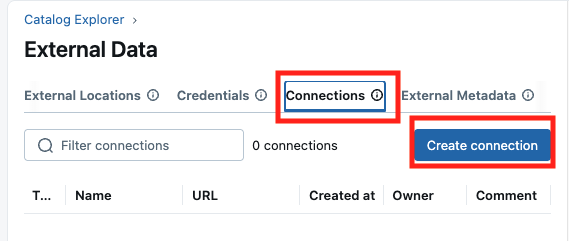
1. Open the connections page
- In the Databricks workspace, click Catalog in the left sidebar.
- Click External Data, then click the gear icon (⚙️) to access the connections section.
Access connections through the gear icon (⚙️), not the External Locations tab.

- Click Connections.
2. Configure the connection
- Enter a connection name — descriptive enough to identify the source system.
- Select the connection type (PostgreSQL, MySQL, SQL Server, Snowflake, etc.). See supported connectors for the full list.
- Enter the authentication details for the external system.
3. Test and create
- Click Test Connection to verify connectivity.
- Once the test passes, click Create.
4. Video walkthrough (optional)
Verify
- In the Databricks workspace, navigate to Catalog > External Data > gear icon (⚙️) > Connections.
- Click the new connection and confirm its status shows as active.
Troubleshoot
Test Connection fails with a timeout
The Databricks VPC/VNet cannot reach the external system. Verify VPC peering, security group rules, and firewall settings. For on-premises systems, a VPN or dedicated network connection may be required.
Test Connection fails with authentication error
Verify the credentials entered match the external system. Check that the database user has the necessary permissions (at minimum, read access on the target schemas).
Next
- Do next: Query federation
- Learn why: Unity Catalog foundations
- Reference: Lakehouse Federation — Databricks docs