Medium-Large Organizations
You'll understand how to extend the governance model with business-unit isolation for larger teams in ~10 min.
Prereqs: Small organizations (read this first — everything below builds on it)
Why this matters
The small-organization model works when everyone shares the same data boundaries. Once multiple business units (finance, marketing, operations) share a Databricks deployment, a single data-engineers group and unprefixed catalogs stop being enough. Teams accidentally access each other's development data, permission grants get confusing, and it becomes hard to tell which workspace or catalog belongs to which department.
Prefixes solve this by adding a predictable naming layer on top of the same catalog/schema/grant model.
Mental model
Same structure as the small-organization model — three environments (dev, staging, prod), medallion schemas, group-based grants — but every resource gets a business-unit prefix. This creates hard naming boundaries between departments without requiring separate Databricks accounts.
How it works
Prefixes for isolation
Add a short business-unit tag to workspaces, catalogs, and groups:
| Resource | Example | What it tells you |
|---|---|---|
| Workspace | finance-development | Development workspace, finance department |
| Catalog | finance_dev | Development projects, finance department |
| Group | finance_data_engineers | Data engineers scoped to finance |
Prefixes prevent cross-department confusion. A finance_data_engineer cannot accidentally be granted access to marketing_dev catalog and schemas because the naming makes the boundary visible.
Catalogs
Each business unit gets its own set of catalogs per environment.
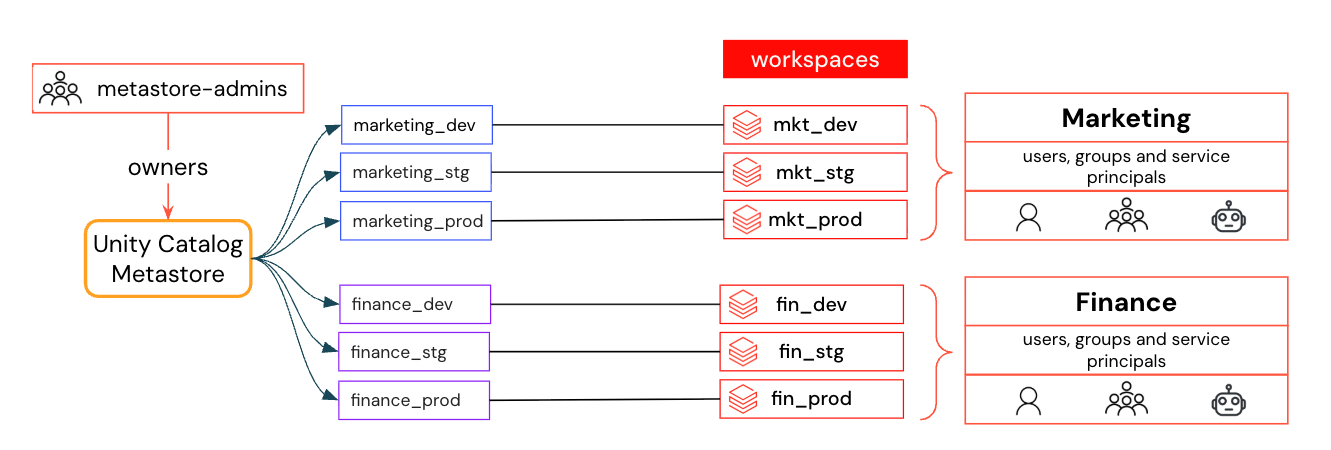
Example for two business units:
- Finance:
dev_finance,stg_finance,prod_finance - Marketing:
dev_marketing,stg_marketing,prod_marketing
The same rules from the small-organization model apply: development for experimentation, staging for validation, production for business-critical data.
Schemas
Within each prefixed catalog, schemas still follow the medallion architecture (bronze, silver, gold) per project.
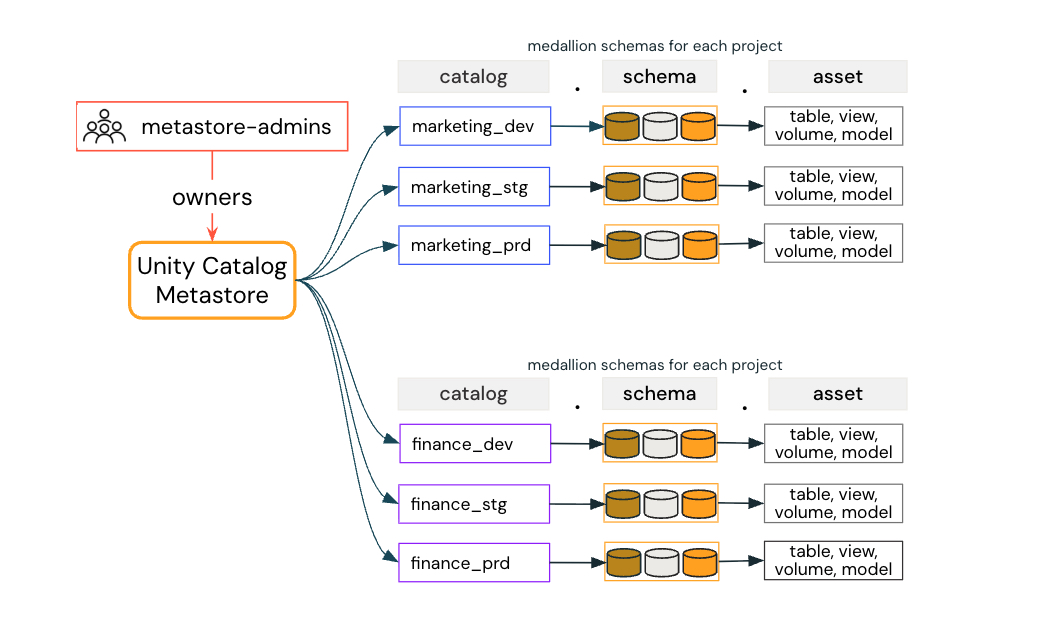
Example: inside dev_finance, a revenue forecasting project uses revenue_bronze, revenue_silver, and revenue_gold.
Permissions and grants
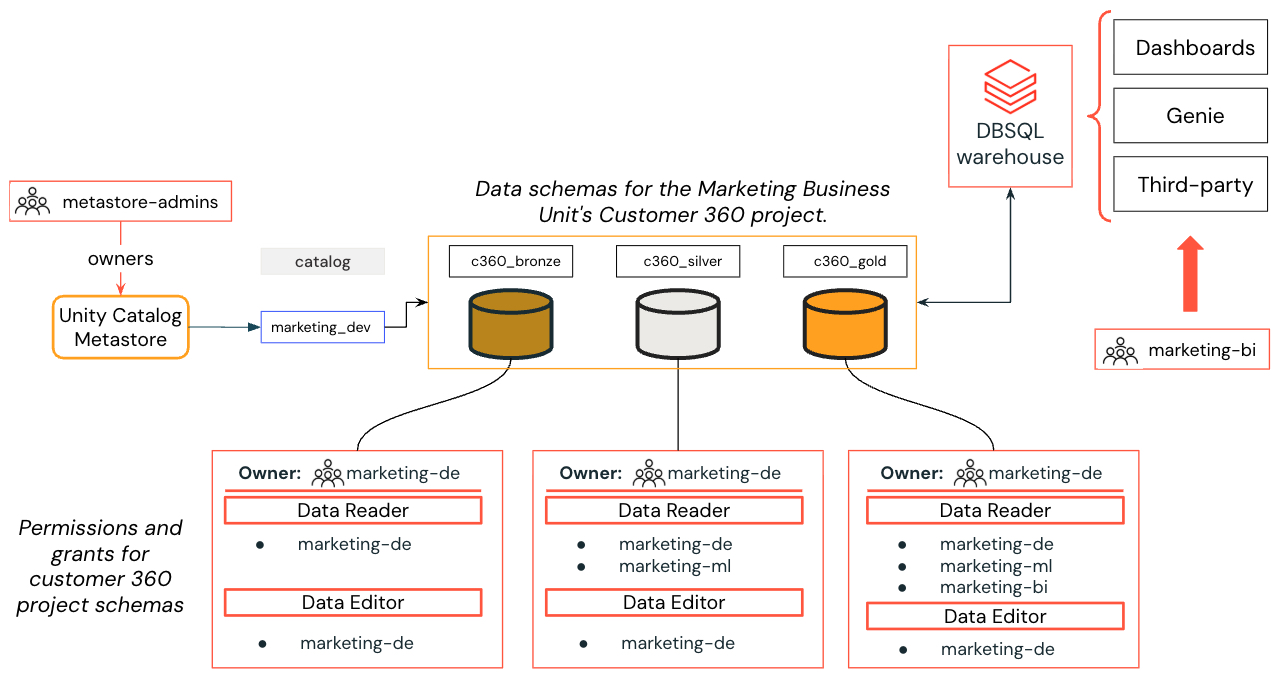
Example: Customer 360 project with prefixed group-based grants.
Grant rules are identical to the small-organization model:
- Ownership — the prefixed group that owns the project owns its schemas (e.g.,
marketing_data_engineersownsc360_bronze,c360_silver,c360_goldinsidedev_marketing). - Sharing — grant at the schema level using Data Reader or Data Editor privileges.
- Cross-department access — when finance needs to read marketing data, the marketing schema owners grant
finance_data_analystsread access on the specific schema. The naming makes the cross-boundary grant explicit and auditable.
When to use / when not to
Use this model when:
- Multiple business units share the same Databricks deployment.
- Teams from different departments must not see each other's development data by default.
- You need organizational clarity in workspace, catalog, and group names.
- Audit and compliance reviews require clear ownership boundaries per department.
Stay with the small-organization model when:
- You have a single business unit or a small team that shares everything.
- Adding prefixes creates overhead without solving a real isolation problem.
Common pitfalls
Inconsistent prefixes
If one team uses fin_ and another uses finance_, the naming scheme loses its value. Define a prefix registry early and enforce it. Two to four characters per business unit is enough.
Duplicating data across catalogs
When marketing needs finance data, the answer is a cross-catalog grant — not a copy of the table in the marketing catalog. Copies drift, waste storage, and create lineage blind spots.
Not scaling groups with the prefix model
If you add prefixed catalogs but keep a single flat data-engineers group, permissions still leak. Every prefixed catalog needs a matching prefixed group.
Next
- Do next: Access your data
- Learn why: Unity Catalog foundations
- Reference: Unity Catalog best practices