Save a Model to Unity Catalog
You'll register a model in Unity Catalog in ~20 min — whether you train it fresh, load it from a Volume, or pull it from Hugging Face.
Prereqs: Prepare Datasets
What you'll build
A model registered to <catalog>.<schema>.<model_name> in Unity Catalog using MLflow.
There are three paths to get there:
- Train a model from scratch and register it directly from the training run.
- Load existing model weights from a UC Volume and register them.
- Import a pre-trained model from Hugging Face and register it.
Prerequisites
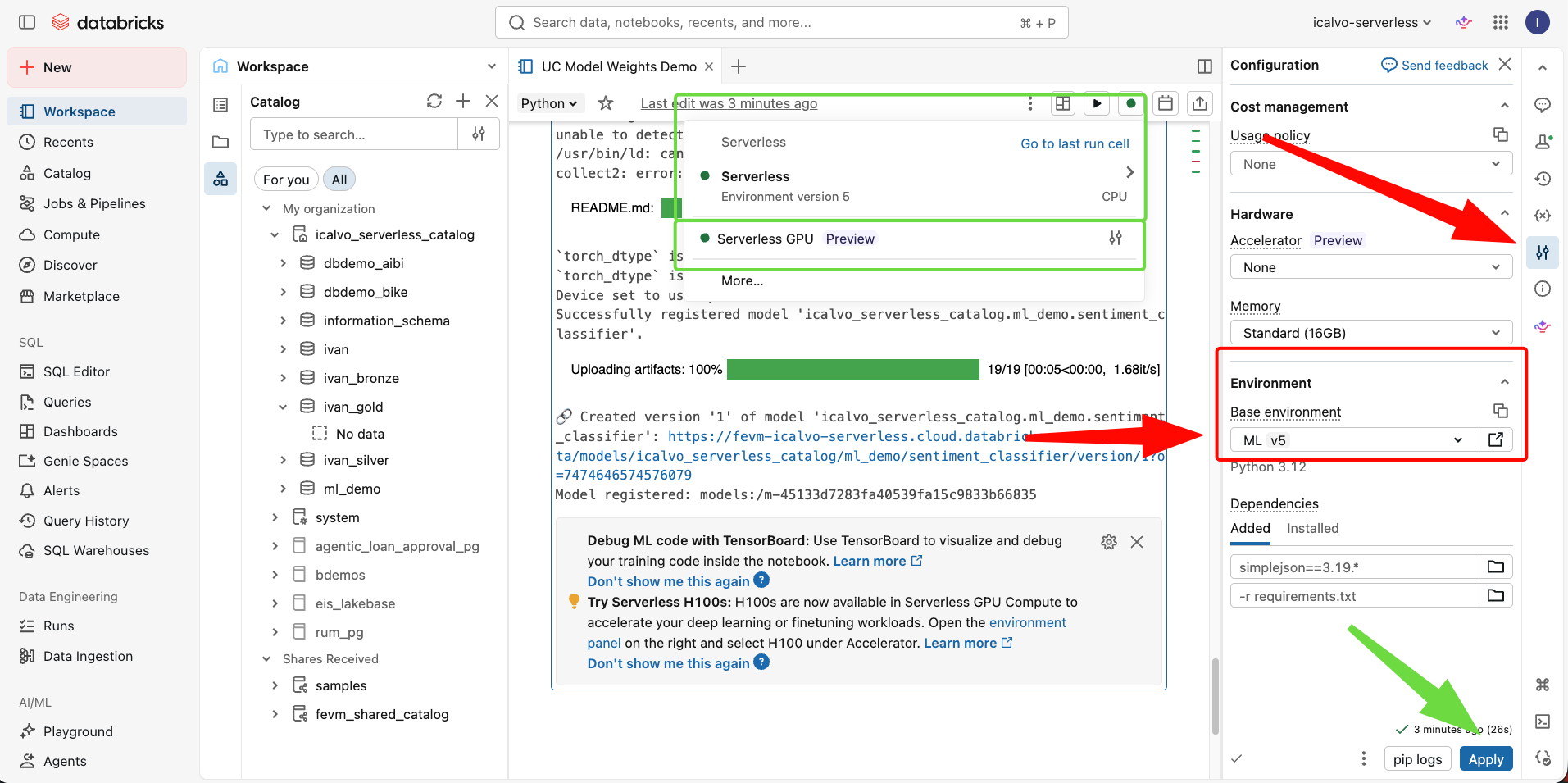
All code on this page was tested on a Serverless ML environment (ML v5, Python 3.12). That environment ships with MLflow and PyTorch pre-installed, so you won't see %pip install mlflow or %pip install torch in the snippets below.
For deep learning workloads, select Serverless GPU in the Accelerator dropdown. GPU-backed compute uses CUDA, which cuts model loading and inference times significantly compared to CPU-only serverless.
Options
| Scenario | Option |
|---|---|
| Your team needs to train a new model on proprietary data and register it for serving | Option A — Train and register |
| You already have model weights and sample inputs exported from another environment | Option B — Load from a UC Volume |
| A pre-trained Hugging Face model fits your use case and you need it governed in Databricks | Option C — Register from Hugging Face |
Option A — Train and register
Use the MLflow 3 traditional ML workflow example notebook. Click Copy link for import to bring it into your workspace.
Option B — Load from a UC Volume
Upload your model weights (e.g., .pkl, .pt, .h5) and a small sample-input file to a UC Volume. The example below uses a scikit-learn pickle file, but the same pattern works for any framework.
Example — register a logistic regression model stored in a Volume:
import mlflow
import pickle
import pandas as pd
from mlflow.models import infer_signature

mlflow.set_registry_uri("databricks-uc")

# Replace with your own catalog and schema
catalog = "MY_CATALOG"
schema = "MY_SCHEMA"

# Point to the weights and sample input already in the Volume
weights_path = f"/Volumes/{catalog}/{schema}/model_weights/logistic_model.pkl"
sample_path = f"/Volumes/{catalog}/{schema}/model_weights/sample_input.csv"

# Load the model weights
with open(weights_path, "rb") as f:
    loaded_model = pickle.load(f)

# Load the sample input and infer the model signature
sample_input = pd.read_csv(sample_path, index_col=0)
signature = infer_signature(sample_input, loaded_model.predict(sample_input).tolist())

# Log and register the model in Unity Catalog
with mlflow.start_run():
    model_info = mlflow.sklearn.log_model(
        loaded_model,
        name="model",
        signature=signature,
        input_example=sample_input,
        registered_model_name=f"{catalog}.{schema}.logistic_classifier",
    )

print(f"Model registered: {model_info.model_uri}")
Swap pickle.load for torch.load or keras.models.load_model and mlflow.sklearn for mlflow.pytorch or mlflow.keras to match your framework.
Option C — Register from Hugging Face
Wrap the model in a transformers pipeline and log it with the transformers flavor. The pipeline carries the tokenizer and config, so the registered model serves without extra setup.
import mlflow
from transformers import pipeline
from mlflow.models import infer_signature

mlflow.set_registry_uri("databricks-uc")

# Replace with your own catalog, schema, and model name
catalog = "MY_CATALOG"
schema = "MY_SCHEMA"
model_name = "sentiment_classifier"
hf_model_id = "distilbert-base-uncased-finetuned-sst-2-english"

# Download the model and tokenizer from Hugging Face
classifier = pipeline("text-classification", model=hf_model_id)

# Run a sample prediction to infer the model signature
sample_input = ["Databricks makes data engineering simple."]
sample_output = classifier(sample_input)
signature = infer_signature(sample_input, sample_output)

# Log and register the model in Unity Catalog
with mlflow.start_run(run_name="huggingface_import"):
    model_info = mlflow.transformers.log_model(
        transformers_model=classifier,
        name="model",
        task="text-classification",
        signature=signature,
        input_example=sample_input,
        registered_model_name=f"{catalog}.{schema}.{model_name}",
    )

client = mlflow.tracking.MlflowClient()
client.set_registered_model_alias(
    f"{catalog}.{schema}.{model_name}",
    "challenger",
    model_info.registered_model_version,
)

print(f"Model registered: {model_info.model_uri}")
Swap distilbert-base-uncased-finetuned-sst-2-english for any Hugging Face model ID and update task to match (e.g., "summarization", "token-classification").
Next
- Do next: Batch Inference
- Learn why: 14. MLOps
- Reference: Install MLflow 3, Manage the model lifecycle, View training results with MLflow runs