Cloud Object Storage
You'll understand how Databricks connects to cloud object storage through Unity Catalog in ~5 min.
Prereqs: Access your data
Why this matters
Most of your data probably already sits in cloud object storage: S3 buckets, ADLS containers, GCS buckets. Databricks needs a governed way to read and write it. Skip that, and teams paste credentials into notebooks or set them at the cluster level, which sidesteps Unity Catalog completely. Then nobody can tell you who touched what.
Mental model
Think of it as a key and a door. The key proves who you are. The door decides what you can open. Two Unity Catalog objects play those roles.
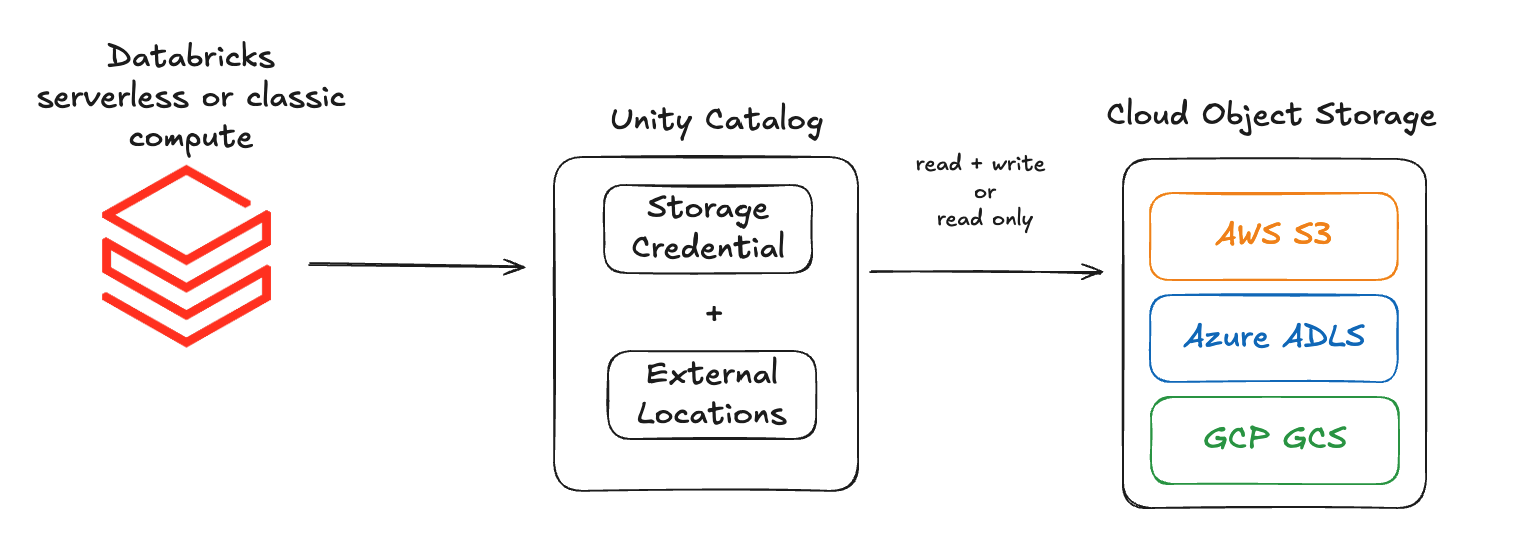
The storage credential is the key. It authenticates Databricks compute to your cloud storage by wrapping a cloud identity:
- An IAM role on AWS and GCP.
- A managed identity on Azure.
The external location is the door. It points at one specific path and is bound to a credential:
- AWS:
s3://mybucket/mydepartment/mydataset/ - Azure:
abfss://mycontainer@mystorageaccount.dfs.core.windows.net/mydataset/ - GCP:
gs://mybucket/mydepartment/mydataset/
The credential proves who you are. The external location and its grants decide who reaches which path.
How it works
- A metastore admin creates a storage credential that references a cloud IAM identity.
- The admin creates one or more external locations that point to specific paths and are bound to that credential.
- Unity Catalog grants on the external location control which users and groups can read or write data at that path.
- Any notebook, job, or SQL query that references the path goes through UC permission checks automatically.
Create storage credentials and external locations
Pick your cloud provider and follow the step-by-step guide:
- AWS: storage credential and external location for Amazon S3.
- Azure: access connector, storage credential, and external location for ADLS Gen2.
- GCP: storage credential and external location for Google Cloud Storage.
Next
- Do next: AWS S3 storage setup
- Learn why: Unity Catalog foundations
- Reference: Connect to cloud object storage using Unity Catalog