Workspace
You'll understand what a Databricks workspace is, what lives inside it, and how many you need in ~5 min.
Prereqs: Account Console
The big picture
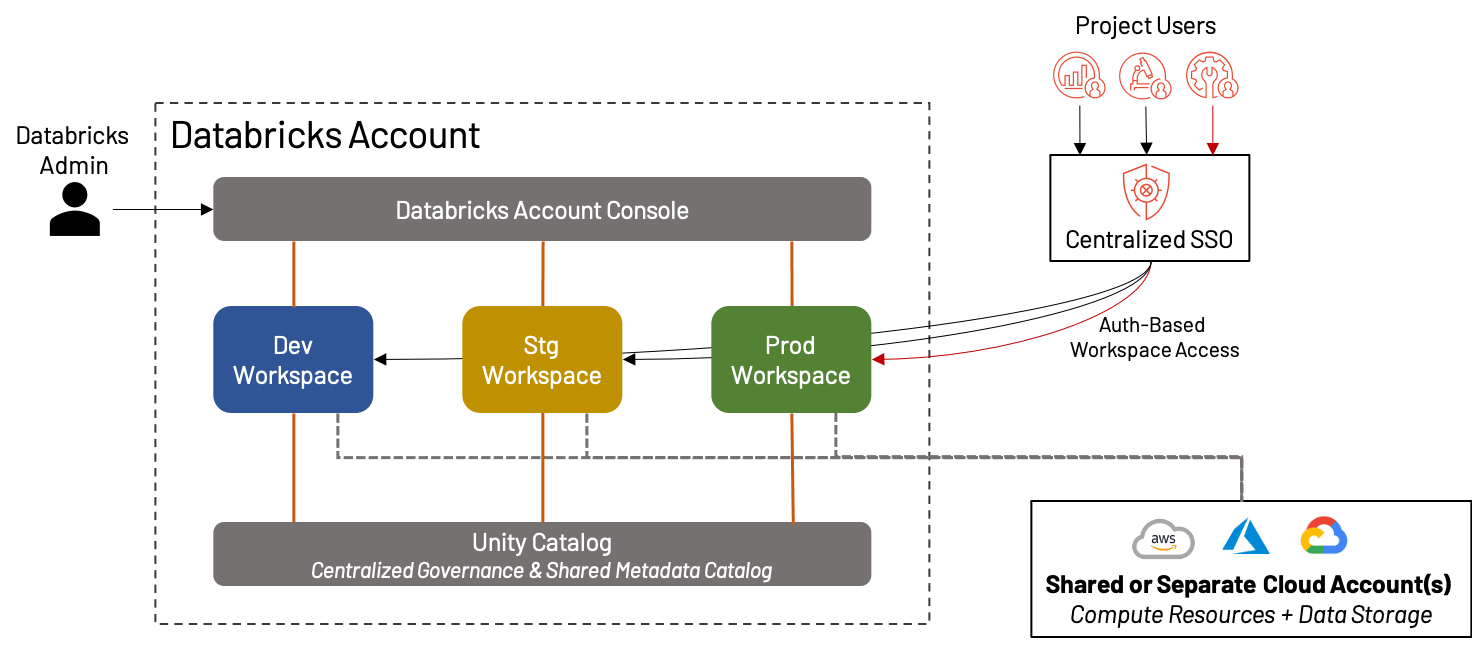
The Databricks workspace is your central hub for accessing all Databricks objects and features. A workspace is a cloud environment tied to a single region in your cloud account, and it is where your data team ultimately works and develops. The real work happens here: notebooks, jobs, dashboards, SQL, and ML experiments all live inside it. A workspace bundles compute, storage references, code, and user permissions into one boundary, and several workspaces share identity and governance through the account console and Unity Catalog. The workspace also features the Genie One interface, a simplified interface designed for business users. It provides a single entry point to view AI/BI dashboards, ask data questions, and use apps without navigating the full workspace.
Start with three workspaces (dev, staging, prod) and resist the urge to spin up one per team. Misjudge how many you need, or misread their boundaries, and you end up with permission sprawl, environments stepping on each other, or a bill bigger than it should be.
How it works
What lives inside a workspace
Each workspace contains:
- Notebooks and repos: code authoring and version control.
- Jobs: scheduled or automatic orchestration (DAGs).
- Pipelines: ingestion and transformation pipelines.
- Clusters and SQL warehouses: compute for engineering, analytics, and ML.
- Dashboards: visualizations and BI artifacts.
- ML experiments and models: tracked via MLflow.
For the full list of workspace objects and their access controls, see:
How many workspaces do you need
Start with three, aligned to the software development lifecycle:
- Development: where engineers iterate on code and test changes.
- Staging: integration testing and user acceptance before production.
- Production: stable workloads serving the business.
You do not need a separate workspace per team or business unit. Add teams to an existing workspace as groups with the right permissions.
If required, every team or business unit can have a dedicated set of workspaces and catalogs.
Data isolation
Workspaces don't isolate data on their own. Physical and logical isolation comes from Unity Catalog, covered next. A workspace can reach any data its attached metastore governs, subject to grants.
Common pitfalls
One workspace for everything
Run dev and production in the same workspace and an untested job can take down production pipelines. The dev/staging/prod split costs little and heads off a lot of incidents.
One workspace per team
Over-split and you create admin overhead and make cross-team collaboration harder. Add teams as groups to shared workspaces unless a hard compliance rule forces you to separate them.
Key terms
| Term | Definition |
|---|---|
| Workspace | A cloud-based Databricks environment scoped to a region, containing notebooks, jobs, compute, and dashboards. |
| Workspace admin | A role with admin privileges scoped to a single workspace: manages users, clusters, and workspace settings. |
Next
- Do next: Unity Catalog
- Learn why: Account Console
- Reference: Databricks workspace overview