UI Integration
Applies To: |
Pipeline Bundle |
Configuration Scope: |
VS Code Settings |
Databricks Docs: |
NA |
Overview
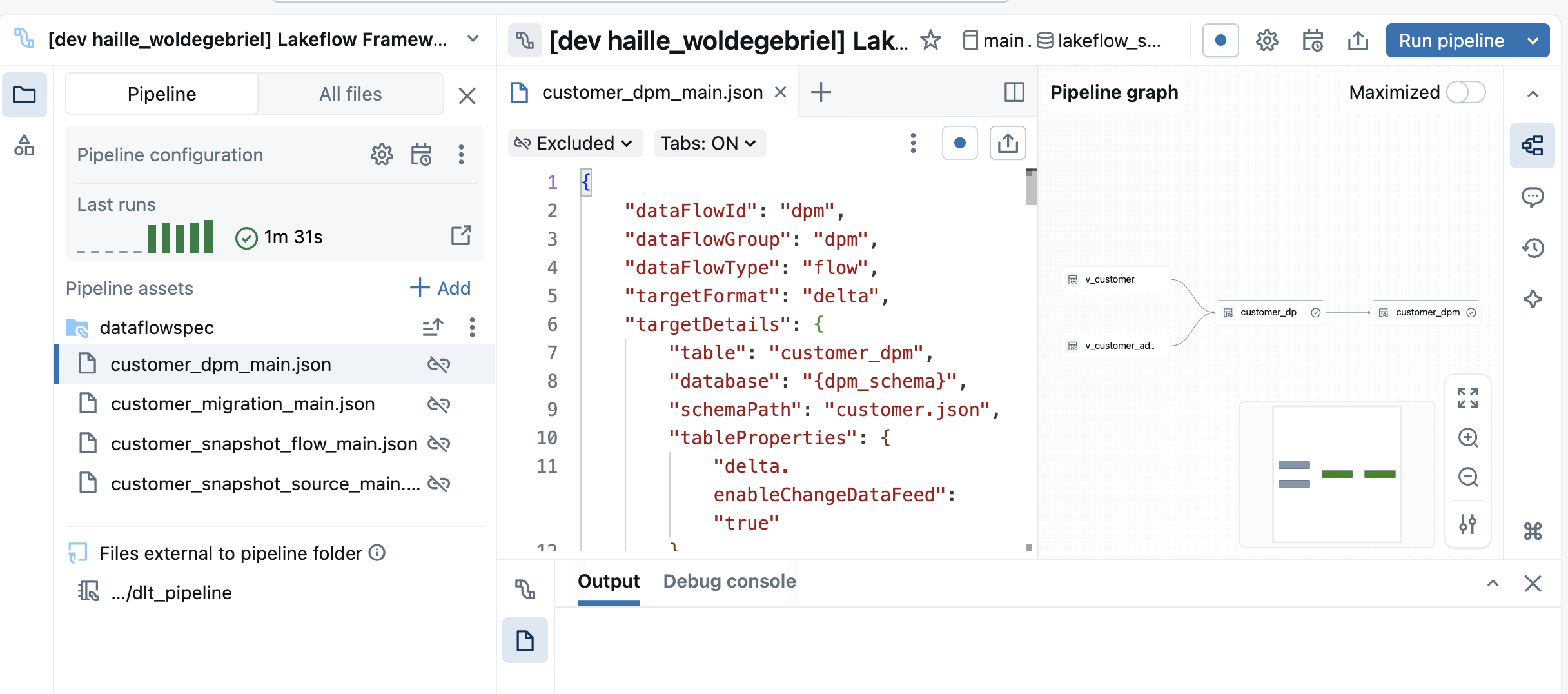
The framework integrates with the Databricks Pipeline Editor UI to provide a seamless experience when creating or editing Data Flow specifications. This allows for live validation and editing of a Data Flow spec while having the ability to debug natively in the Pipeline Editor.
Configuration to enable Pipeline Editor UI Integration
To enable UI Integration, you need to add a root_path configuration to your Pipeline resource file that points to the root directory of the Data Flow specifications for that pipeline as shown below.
resources:
    pipelines:
        lakeflow_samples_bronze_base_pipeline:
        name: Lakeflow Framework - Bronze - Base Pipeline (${var.logical_env})
        channel: CURRENT
        serverless: true
        catalog: ${var.catalog}
        schema: ${var.schema}
        libraries:
            - notebook:
                path: ${var.framework_source_path}/dlt_pipeline

        configuration:
            bundle.sourcePath: ${workspace.file_path}/src
            bundle.target: ${bundle.target}
            framework.sourcePath: ${var.framework_source_path}
            workspace.host: ${var.workspace_host}
            pipeline.layer: ${var.layer}
            logicalEnv: ${var.logical_env}
            pipeline.dataFlowGroupFilter: base_samples
        **root_path**: ${workspace.file_path}/src/dataflows/base_samples/dataflowspec
Below is an example of the Pipeline Editor UI integration.