Casper's January Update
It’s been a strong start to 2026 at Casper’s! This past month we added two new Databricks Knowledge Assistant demos, made massive improvements to our data generator, and added Claude-specific instructions to the caspers-kitchens repo for easier development and deployment.
Databricks Knowledge Assistant
We found two awesome use cases for the Knowledge Assistant this month, and both are available and easy to try yourself today.
Live Chat for Field Workers
The first Knowledge Assistant use case is creating a live chat interface for the field workers in the ghost kitchens to address questions where and when they occur, in real time. Knowledge Assistant strikes an exceptional balance between power and simplicity so we achieved this using only a few clicks.
The caspers-kitchens repo now ships with 5 operation manual PDFs. The first four are location specific for our largest ghost kitchen locations, and the fifth is the corporate level employee manual.
RAG Over Code
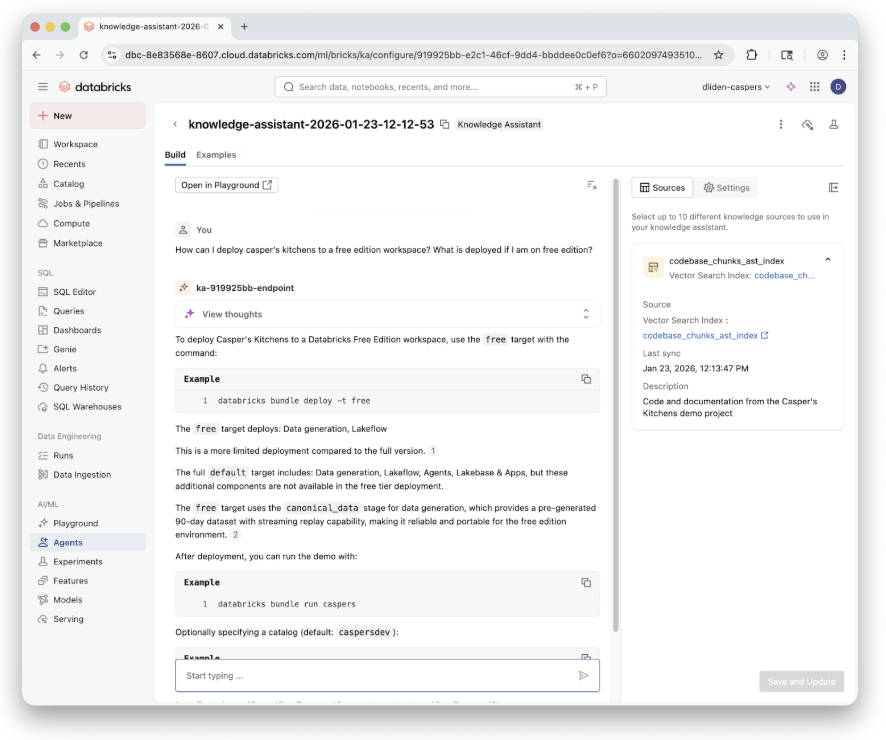
The second Knowledge Assistant use case, RAG over the caspers-kitchens code base, was for our developers.
It turns out that building RAG over code is a lot different than over regular text. Code has a nested structure, mixed file types, and has complex semantic and ontological boundaries that regular text just doesn’t have.
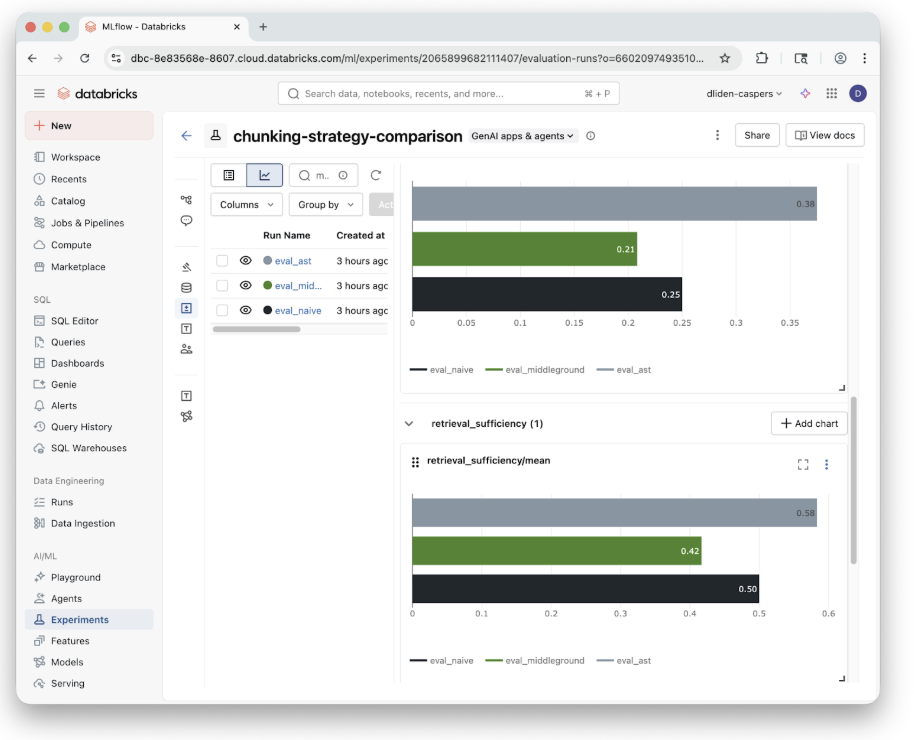
This means we need to pay special attention to how the codebase is actually chunked in the vector database the Knowledge Assistant uses. Daniel has an amazing demo on using MLflow to compare different chunking strategies on the caspers-kitchens repository which you can easily apply to your own code.
Data Generation and Playback
Our original data generator served us well for our early demos but we found it suffered from some limitations which were worth addressing.
The Problems
First, the generator was implemented as a long running job. This is expensive and particularly inefficient for a data generator that is mostly idle. This also causes issues with Databricks Serverless, the compute type the job is configured to use, which, quite reasonably, begins to time out after 300+ hours. If you do have the need for an “always on” long running job, it’s reasonable (and probably cheaper) to provision dedicated compute for it.
Second, the generator was literally generating all the data from scratch, every time it was run. That means every single order event and driver simulation was hitting OpenStreetMap and calculating the same paths again, and again, and again.
The Solution
To address both these points we decided to break our data generator into two: offline generation of all events (and one canonical dataset shipped in the repo), and a small job that reads from the pregenerated order data and “replays” it by writing out events as JSON.
We were quite excited by PySpark’s Data Source API, and the streaming source API in particular. Our thinking was that if we could successfully wrap a pregenerated data set with these interfaces we would get beautiful streaming semantics out of the box that would let us arbitrarily “fast forward” our data generation on any schedule we like. We prototyped this, and while it actually worked, it turned out to be more trouble than it’s worth for our simple use.
In our case, it turned out to be easier to implement a scheduled job using no streaming APIs and manage the progress with a small checkpoint file we write ourselves every time the job is run. This highlights a growing trend and questions about what libraries really mean in an LLM world.
In any case, our new simulated data replay is faster, more flexible, and nicely abstracted from the underlying events. If you’re looking for an alternate data story, all you need to do is generate new events offline and you’re ready to go.
Claude and LLM-First Development
Like most developers, we’re spending a LOT of time experimenting with autonomous coding agents and new CLI tools like Claude Code and OpenCode. We were actually a little surprised to find that the out of the box configurations really struggled with the Casper’s code base.
For example, although we have an existing example of a medallion architecture with Spark Declarative Pipelines, the agent would struggle to create a new one with a slightly different data flow.
Why Casper’s is Hard for LLMs
The reason for this is that Casper’s has both static assets handled by Databricks Asset Bundles and runtime assets which are handled by code when the demo is running. This is hard enough for a human to understand, let alone an LLM. For example, each of our demo stages is defined statically in our DAB, but each of those stages can also launch several jobs of their own during runtime. Expecting an LLM to trace static assets and piece together their runtime dynamics remains, at least for now, unreasonable.
The Fix: CLAUDE.md
The good news is that after sufficient experimentation we were able to narrow down a few key instructions in a CLAUDE.md file so that Claude could understand all the layers of the project and follow a certain paradigm for editing existing demos and implementing new ones. We also added some custom hot-fix instructions so Claude could implement and test changes in a live running deployment using the Databricks SDK.
The Biggest Takeaway
The biggest takeaway is that if you force yourself to stay in an agentic UX pattern while developing, as opposed to jumping into the code yourself and manually shortcutting when the agent struggles, the agent will eventually achieve its goal. Sometimes you just have to be vigilant in prompting it to do EXACTLY what you want. With some persistence, and a few meta prompts (“document the mistakes you just made and how to avoid them next time in your instructions”), it’s likely your coding experience with these new tools will drastically improve.
What’s Next?
We have a lot of new ideas to experiment with next month. Here’s a small selection of the things we’re looking forward to:
- ZeroBus: ZeroBus allows for row-level ingest via a simple REST API directly into Delta tables. This means no more writing JSON and converting it to Delta.
- Dashboards: We’ll add a small set of canonical dashboards that ship with Casper’s and show the system in motion: orders, drivers, latency, and state as data moves through the stack.
- Caspers One: We’re experimenting with curated Genie spaces and views designed to work well with the Databricks One experience, focusing on clean, intentional surfaces for business users over the core data.
- Ordering App: A lightweight app to place an order and watch it propagate through the entire system, from ingest to analytics and AI.
Stay tuned for more…