Choosing the Best Model for Your Agent
Introduction
When you’re building an agent that needs to query your data and make decisions, comparing models across providers often means managing fragmented authentication, separate workspaces, and incompatible evaluation setups.
Databricks Model Serving solves these problems with native access to OpenAI, Anthropic, Google, and Meta models in one workspace with unified authentication and governance. You can use MLflow on Databricks to compare different models systematically with sophisticated agent observability and evaluation tools. In other words, you have all the tools you need to pick the best model for the job.
Suppose you’re building a complaint triage agent for Casper’s Kitchens, a simulated ghost kitchen running on Databricks. The agent queries order data through Unity Catalog functions, analyzes complaints, and recommends whether to offer a credit or escalate to human review. Which model should power it?
This post walks through the evaluation workflow: building a diverse test dataset, defining complementary judges, gathering human feedback to align them with your criteria, then comparing models to choose the best one. The full notebook includes complete implementation details. The evaluation principles apply to any tool-calling agent—code assistants, retrieval systems, or domain-specific workflows like this complaint triage example.
The Evaluation Workflow
Casper’s Kitchens is trying to improve customer service response times using an agent that analyzes customer complaints and recommends actions, suggesting a credit or escalating to human review. We have realistic data flowing from the Casper’s environment that the agent can query through Unity Catalog functions. Our goal is to determine which model performs best for this specific task.
Generic benchmarks won’t answer this. We need to evaluate models on our data, using our evaluation criteria, in our agent’s specific context. MLflow’s evaluation framework makes this systematic: generate traces, define judges, gather human feedback, align the judges with that feedback, then compare models at scale.
Here’s the workflow we’ll follow:
- Create an evaluation dataset: Diverse complaint scenarios covering delivery delays, missing items, food quality issues, and edge cases
- Define MLflow scorers: Two complementary judges—one that inspects execution traces, one that evaluates rationale quality
- Run baseline evaluation: Generate traces with one model and evaluate them
- Add human feedback: Review results in MLflow UI and provide corrections
- Align the judge: Use SIMBA optimization to improve judge alignment with human judgment
- Compare models: Evaluate additional models with the aligned judge and review results
Note that if you want to run this full example as written, you first need to configure Casper’s Kitchens in your Databricks environment. You can find detailed instructions for doing so here.
Let’s walk through the key steps in the evaluation workflow.
Evaluation Dataset
To thoroughly test model performance, we need diverse complaint scenarios that cover different situations the agent might encounter. We created 15 test cases by retrieving real order IDs from the Casper’s data and pairing them with complaints covering different categories:
# Delivery delay
"My order took forever to arrive! Order ID: 9d254f087ee04f188c99d1d8771c5e3b"

# Food quality (specific)
"My falafel was completely soggy and inedible. Order: d966567ceb664b5aa0e620c7fe368bf3"

# Missing items
"My entire falafel bowl was missing from the order! Order: 7b60ecb7056545109b7237782b84ccf5"

# Service issue (should escalate)
"Your driver was extremely rude to me. Order: f76017ea81524a7eb4d22b57ca853c4e"

# Health/safety concern (urgent escalation)
"This food made me sick, possible food poisoning. Order: 66538da0cbe1483a9368613eb9fa1617"

# Multiple issues combined
"Order 4dd82db6fd584ba0bb1ccb8cecd4c26f was late AND missing items AND cold!"
The diversity matters. Some complaints have clear evidence in the data (delivery delays we can verify with timestamps). Others require judgment (food quality claims). Some should escalate immediately (health concerns). This range reveals how different models handle ambiguity, edge cases, and multi-factor decisions.
We format the data to match what the agent expects—a dictionary with inputs containing the complaint text:
eval_data = [{"inputs": {"complaint": c}} for c in complaints]
Before running the full evaluation, let’s test the agent on a single complaint to see what it produces:
# Create agent instance
agent = ComplaintsAgentCore(
    model_endpoint="databricks-meta-llama-3-3-70b-instruct",
    catalog=CATALOG
)

# Test on a single complaint
test_complaint = "My order took forever to arrive! Order ID: 1995fdb9fb65469aa2e5a17025b368f9"
result = agent.invoke(test_complaint)
Example output:
{
    'order_id': '1995fdb9fb65469aa2e5a17025b368f9',
    'complaint_category': 'delivery_delay',
    'decision': 'suggest_credit',
    'credit_amount': 1.0,
    'confidence': 'medium',
    'rationale': 'Order 1995fdb9fb65469aa2e5a17025b368f9 delivered in 31.38 min (created 2025-10-24 01:50:09, delivered 02:21:32). San Francisco benchmarks: P50 26.13, P75 31.05, P99 37.56. Actual time exceeds P75 by ~0.33 min and is well below P99. P90 benchmark not available; given the small overage above P75, this likely falls between P75–P90. Recommend 15% of the order subtotal ($8.30) for delay, rounded to nearest $0.50. Calculation: 15% = $1.245 → $1.00 after rounding. Confidence medium due to absence of P90 percentile but otherwise data-supported.'
}
The agent retrieved timing data, compared it to location benchmarks, calculated a credit amount, and provided a detailed rationale. This structured output gives us specific criteria to evaluate: did it use correct data? Is the rationale clear? Is the credit amount justified?
Each agent invocation generates an execution trace that MLflow captures automatically. The trace records every step—which tools were called, what data they returned, how the model processed that data, and what it outputted. This trace data is what enables our judges to verify that decisions are grounded in actual tool outputs.
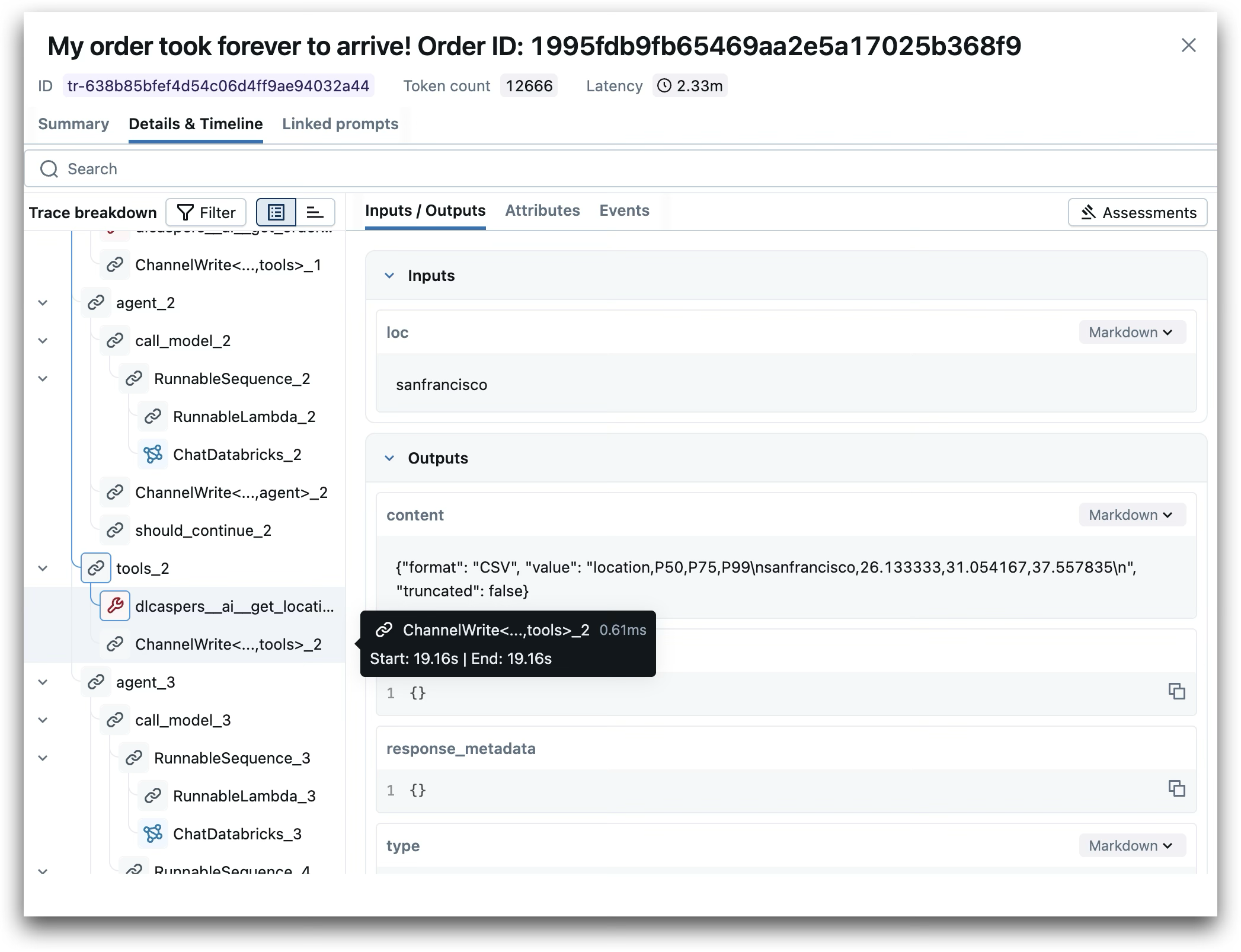
MLflow execution trace showing the agent’s tool calls and decision process for a delivery delay complaint
MLflow Scorers
MLflow provides several types of scorers for different evaluation needs: predefined scorers for quick starts, guidelines-based scorers for natural language criteria, code-based scorers for custom logic, and more. We’ll use two advanced approaches here: an agent-as-a-judge scorer that has tools enabling it to inspect execution traces, and a template-based AI scorer that can be aligned with human feedback.
Trace-Aware Judge: Evidence Groundedness
This judge acts as an agent itself. It uses the {{ trace }} template variable, which gives it access to Model Context Protocol tools for searching and retrieving details from execution traces. The judge can inspect what data was returned by each Unity Catalog function and verify that the agent’s reasoning matches the actual tool outputs.
from mlflow.genai.judges import make_judge

evidence_groundedness_judge = make_judge(
    name="evidence_groundedness",
    instructions="""
Evaluate whether the agent's decision is grounded in evidence from the execution {{ trace }}.

Investigation checklist:
1. Find spans where tools were called (get_order_overview, get_order_timing, get_location_timings)
2. Extract the actual outputs returned by these tool calls
3. Compare tool outputs against claims made in the agent's rationale
4. Verify that credit amounts or escalation decisions match the tool data

Customer complaint: {{ inputs }}
Agent's final output: {{ outputs }}

Rate as PASS if rationale claims match tool outputs, FAIL if contradictions exist.
""",
    model="databricks:/databricks-claude-sonnet-4-5"
)
Note that we specify which model powers the judge—Claude Sonnet 4.5 in this case. Databricks’ multi-model support matters here too: just as you can choose the best model for your agent, you can choose the best model for your judges. Different models may excel at different evaluation tasks. Judge model choice affects evaluation quality.
Template-Based Judge: Rationale Sufficiency
This judge evaluates whether a human could understand the decision from the rationale alone. It uses {{ inputs }} and {{ outputs }} templates to assess clarity and completeness. We’ll align this judge with human feedback using SIMBA optimization.
rationale_sufficiency_judge = make_judge(
    name="rationale_sufficiency",
    instructions="""
Evaluate whether the agent's rationale sufficiently explains and justifies the decision.

Customer complaint: {{ inputs }}
Agent's output: {{ outputs }}

Check if a human reading the rationale can clearly understand:
1. What decision was made (suggest_credit or escalate)
2. Why that decision was appropriate
3. How any credit amount was determined

Rate as PASS if the rationale is clear, complete, and logically connects evidence to decision.
Rate as FAIL if vague, missing key information, or logic is unclear.
""",
    model="databricks:/databricks-claude-sonnet-4-5"
)
These two judges are complementary. The trace-aware judge verifies factual accuracy against tool outputs. To do so, it needs access to the tool calls from the traces. The template judge assesses whether the reasoning is understandable to humans. It only needs access to the inputs and outputs to make this determination.
For Casper’s, this combination is critical. Decisions regarding delivery delays need grounding in actual timestamps and location data, while escalation decisions need clear reasoning that a human reviewer can act on.
Running the Evaluation
We run evaluation in two phases: generate traces by invoking the agent, then retrieve those traces and evaluate them with judges. This separation is useful—you can iterate on judge definitions without re-running the agent. There are, however, other approaches such as defining a predict_fn and evaluating each agent response right after it is generated.
Baseline Evaluation
We start by evaluating a single model to generate traces we can inspect and annotate. We’ll use Llama 3.3 70B for the baseline. These traces serve two purposes: they help us understand how the agent and scorers behave, and they give us concrete examples to annotate with human feedback for aligning the template judge.
First, we’ll run the agent on each complaint to generate traces. Note that we tag each trace so we can easily retrieve the traces we need later:
agent = ComplaintsAgentCore(
    model_endpoint="databricks-meta-llama-3-3-70b-instruct",
    catalog=CATALOG
)

with mlflow.start_run(run_name="baseline_llama") as run:
    for row in eval_data:
        complaint = row['inputs']['complaint']
        result = agent.invoke(complaint)

        trace_id = mlflow.get_last_active_trace_id()
        mlflow.set_trace_tag(trace_id, "eval_group", "baseline_llama")
Now that we have run the agent against the evaluation dataset, generating an execution trace from each invocation, we can retrieve the traces and evaluate them:
traces = mlflow.search_traces(
    experiment_ids=[experiment_id],
    filter_string="tags.eval_group = 'baseline_llama'",
    max_results=15
)

result = mlflow.genai.evaluate(
    data=traces,
    scorers=[evidence_groundedness_judge, rationale_sufficiency_judge]
)
The judges evaluate based on the instructions we wrote, but AI judges are nondeterministic AI models themselves. Even with specific instructions, we can’t know in advance whether the judge will interpret and apply them exactly as we intend. Without alignment, we might be evaluating against some misinterpretation of our initial prompt rather than our actual quality standards.
Add Human Feedback
Human feedback and alignment let us correct this. By reviewing the judge’s assessments and providing our own, we create training data that teaches the judge how to interpret our criteria correctly.
Navigate to the Evaluation tab in the MLflow UI. Find your run and review the judge assessments for each trace. Click the “+” next to the rationale_sufficiency scorer to add your own evaluation. Provide your assessment (PASS or FAIL) and a rationale explaining your reasoning.
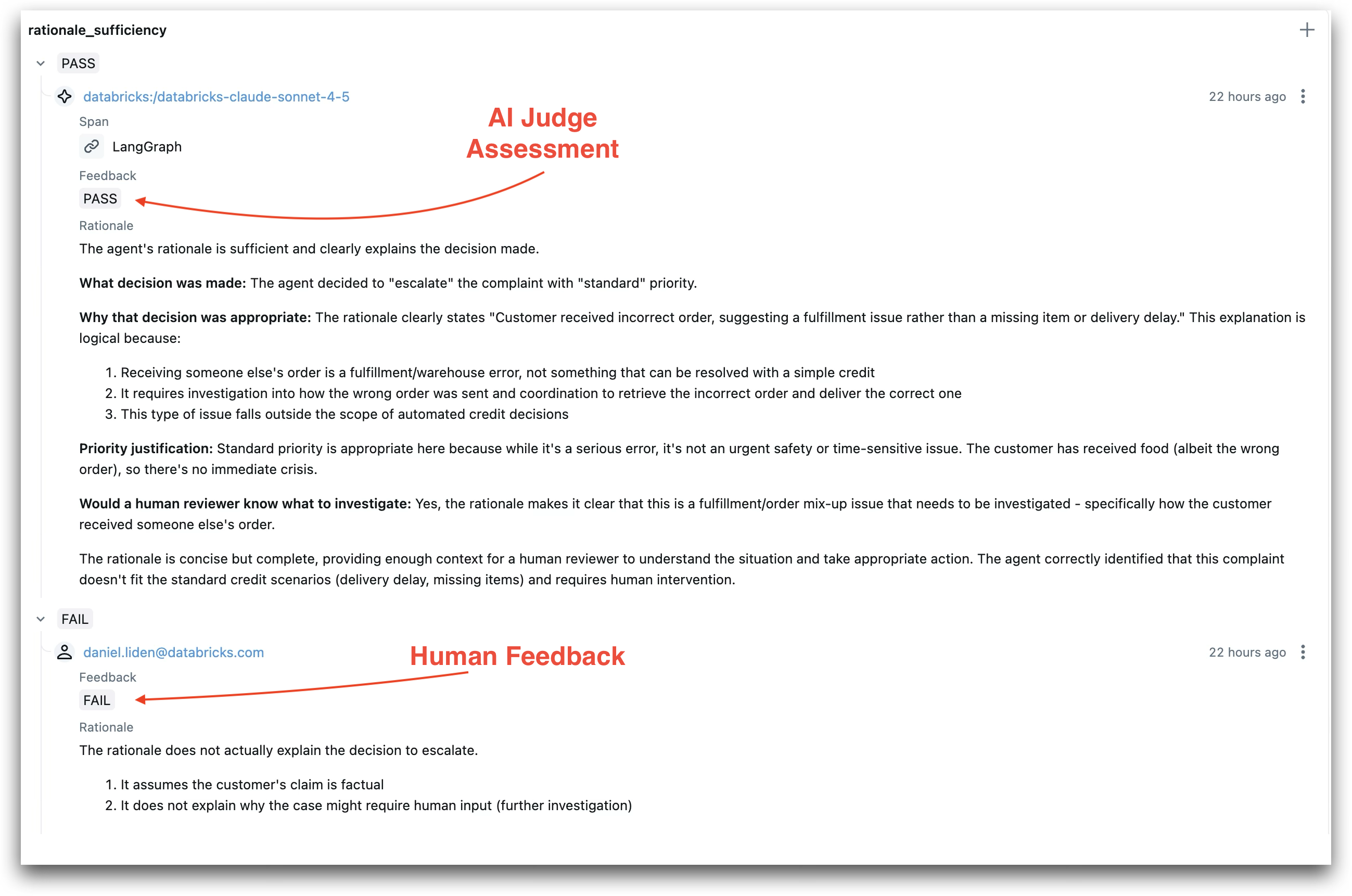
AI judge assessment (PASS) compared with human feedback (FAIL)—disagreements like this help align the judge with your quality standards
Add feedback even when you agree with the judge. The SIMBA optimizer needs examples of both agreement and disagreement to learn your specific evaluation criteria.
Align the Judge
Once you’ve provided human feedback, use SIMBA optimization to align the judge. MLflow uses DSPy’s SIMBA optimizer, which identifies challenging examples and uses an LLM to improve the prompt instructions.
Call align on the rationale_sufficiency judge with the annotated traces:
traces_with_feedback = mlflow.search_traces(
    experiment_ids=[experiment_id],
    filter_string="tags.eval_group = 'baseline_llama'",
    max_results=15,
    return_type="list"
)

aligned_judge = rationale_sufficiency_judge.align(traces_with_feedback)
The optimizer analyzes disagreements and generates improved instructions. In our case, based on the annotations we provided, the aligned instructions now include a new section about missing item complaints:
If the module receives a complaint about a missing item, it should focus solely on the
specifics of that complaint. It must clearly state what item is missing, provide the
item's price from the order, and explain how the credit amount is calculated based on
that price. Avoid discussing irrelevant factors like delivery time unless they directly
impact the rationale for the decision. Ensure that all statements are consistent and
logically support the decision made, clarifying why a credit is appropriate in the
context of the complaint.
What the optimizer adds depends on your specific annotations. The original judge had general criteria (clear, complete, logical). In this example, the aligned version adds:
- Specific checks for credit decisions: Must cite numbers (delivery time, percentiles, amounts), show logical connection between evidence and credit, explain fairness
- Specific checks for escalations: Must explain why escalation is needed, justify priority level, indicate what to investigate
- Domain-specific rules: New paragraph about missing item complaints—focus on specifics, state what’s missing, provide item price, explain calculation, avoid irrelevant factors like delivery time
These additions reflect patterns the optimizer detected in human feedback. If humans consistently marked rationales as FAIL for missing specific details about items or credit calculations, the aligned judge now explicitly checks for those details.
Note that alignment isn’t yet supported for trace-aware judges using {{ trace }}, so we align only the template-based rationale_sufficiency judge.
Compare Models
Now we can compare candidate models using the aligned judge. Create a new agent instance with a different endpoint:
agent = ComplaintsAgentCore(
    model_endpoint="databricks-gpt-5-mini",
    catalog=CATALOG
)

with mlflow.start_run(run_name="comparison_gpt5") as run:
    for row in eval_data:
        complaint = row['inputs']['complaint']
        result = agent.invoke(complaint)

        trace_id = mlflow.get_last_active_trace_id()
        mlflow.set_trace_tag(trace_id, "eval_group", "comparison_gpt5")

traces = mlflow.search_traces(
    experiment_ids=[experiment_id],
    filter_string="tags.eval_group = 'comparison_gpt5'",
    max_results=15
)

result = mlflow.genai.evaluate(
    data=traces,
    scorers=[aligned_judge, evidence_groundedness_judge]
)
The aligned judge provides more reliable comparisons because it reflects your specific quality standards. You can repeat this for as many models as you want—each runs on the same evaluation dataset and gets assessed by the same aligned judges.
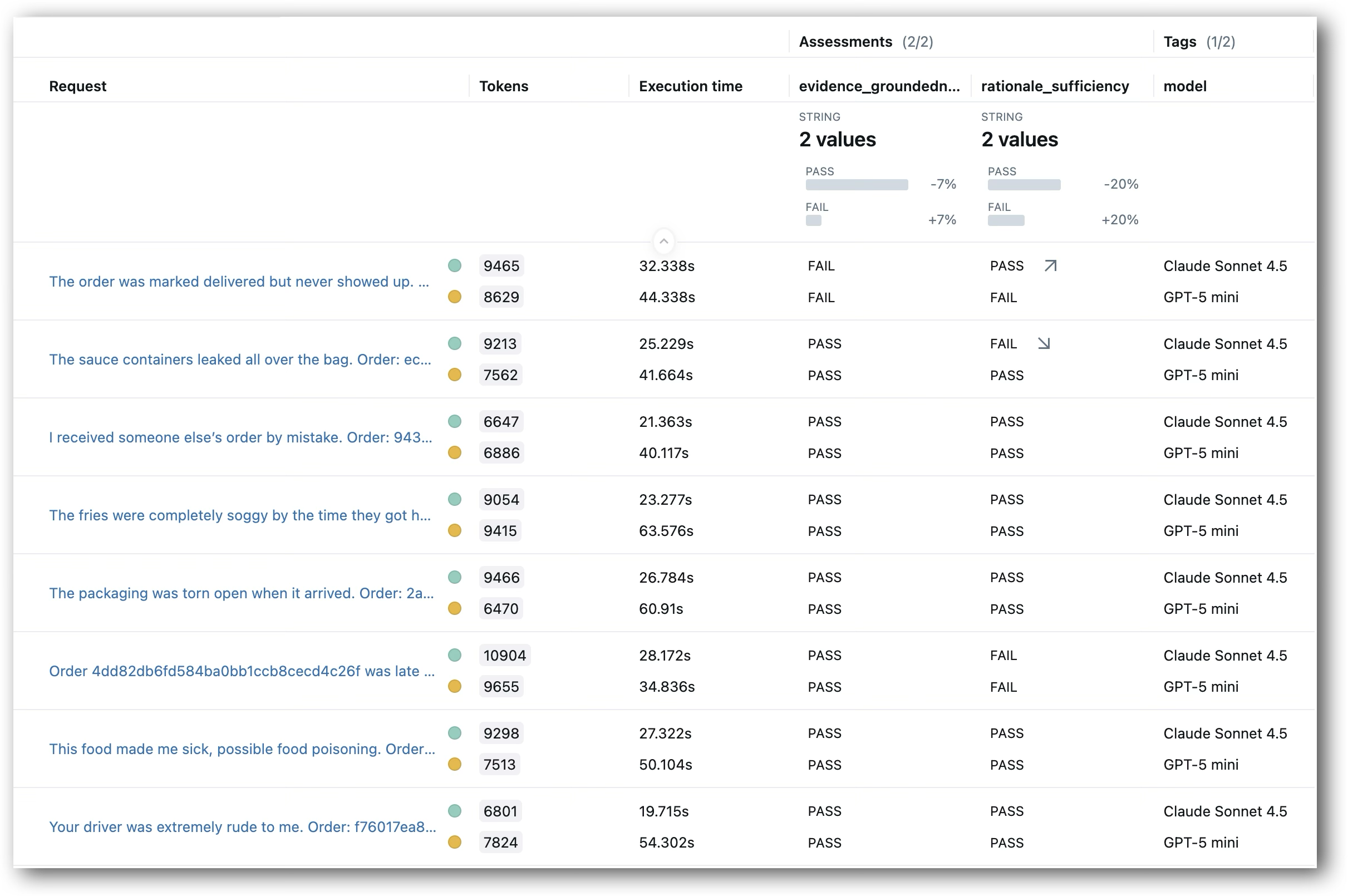
Side-by-side model comparison across test cases, evaluated by both judges
In a production scenario, you’d typically want to evaluate models on a held-out test set that’s separate from the examples you used for alignment. This prevents overfitting to your alignment data and gives you a more accurate picture of how models perform on new cases. Here, we’re using the same 15 examples for simplicity, but the workflow scales to larger datasets with proper train/test splits.
What This Enables
This process enabled Casper’s to rigorously compare different models to power its complaints agent, without needing to leave Databricks or authenticate outside resources.
Model choice stops being a gamble when you can evaluate systematically. Databricks gives you access to OpenAI, Anthropic, Google, and Meta models in one workspace with unified authentication and governance. You’re not locked into a single provider’s roadmap or pricing—you can compare GPT-5 against Claude against Llama on your actual data and switch based on performance, cost, or latency requirements.
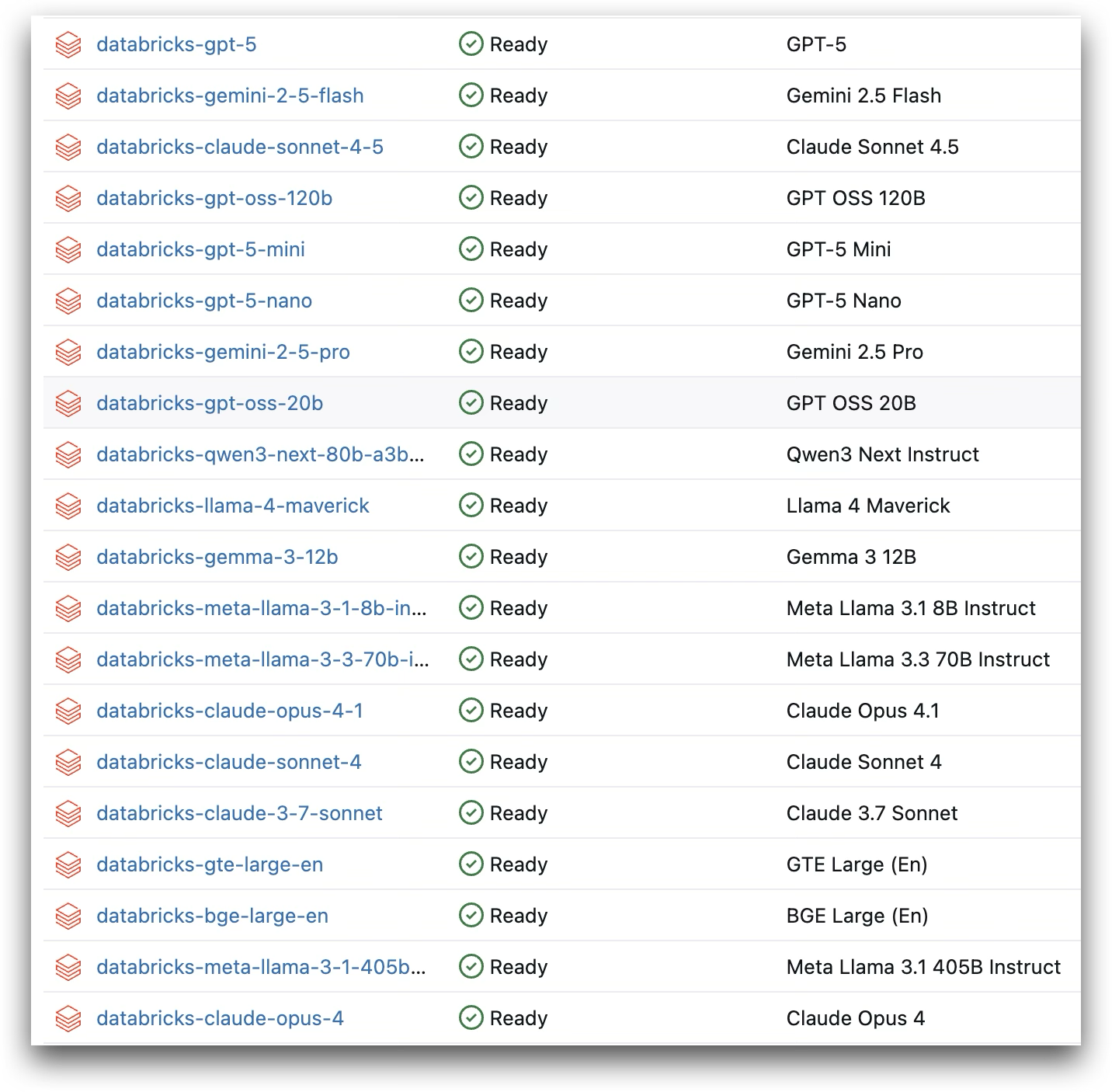
Available foundation models in Databricks Model Serving, spanning OpenAI, Anthropic, Google, Meta, and more
The evaluation tools matter as much as the model access. Trace-aware judges verify that agents make decisions grounded in actual tool outputs. Human alignment through SIMBA lets you encode your specific quality standards into automated evaluation. Together, these capabilities turn model variety from a headache into an advantage.
This workflow extends beyond complaint triage. Use the same evaluation patterns for code generation agents (does the code match requirements from retrieved documentation?), retrieval systems (are answers grounded in the chunks that were fetched?), or any agent that calls tools and makes decisions based on what they return.
The full notebook includes complete implementation details. The Casper’s Kitchens environment provides the realistic data infrastructure if you want to run everything end-to-end. The evaluation principles work regardless of your agent implementation—start with your own use case and adapt the judge definitions to match your quality criteria.